The Clinical Problem: Fragmented Lab Records
Healthcare interoperability remains one of the most persistent challenges in clinical practice. When patients see specialists, switch insurance plans, or move, their health records get scattered across incompatible platforms. This fragmentation impacts clinical decision-making and practice efficiency.
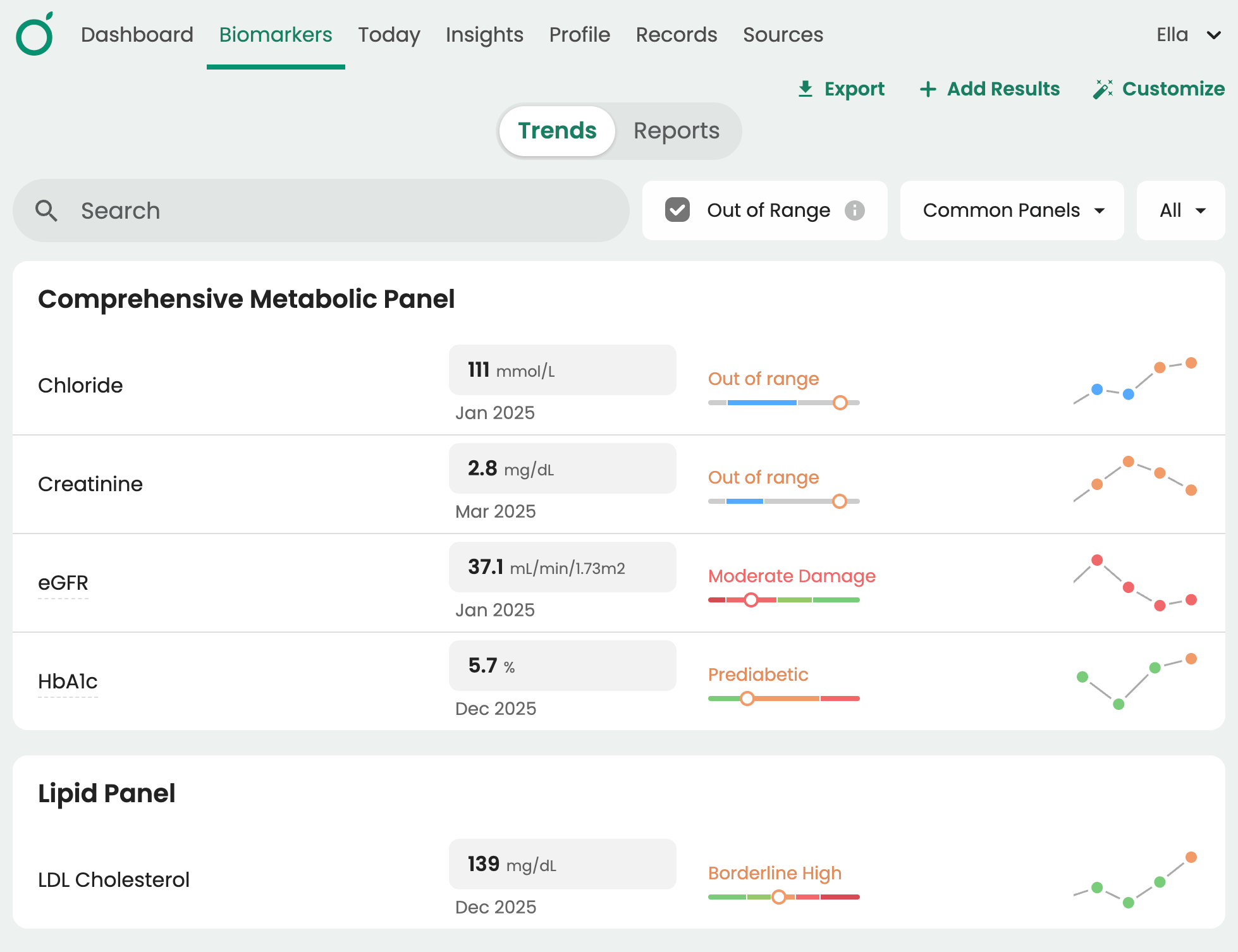
Consider a patient with pre-diabetes who had kidney function tests at three different facilities over two years. Without a unified view of their lab history, it’s hard to spot trends. Did their kidney function change gradually, or was there a sudden spike that requires intervention? When results are siloed, the answer is hard to find.
The Guava Provider Dashboard resolves these issues by creating a centralized health data hub that provides a longitudinal view of all lab data, serving as a single source of truth.
How Guava Aggregates Results From Multiple Labs
The Provider Dashboard integrates and unifies lab data from any source, giving clinicians a comprehensive picture of a patient's health regardless of where their tests were performed. Data reaches Guava in two main ways: direct integrations your practice sets up, and records patients connect themselves.
Direct Practice Integrations
When your practice connects its EHR or practice management system, patient records, labs, and clinical data sync into Guava for you and your patients. Current direct integrations include:
- Elation: Sync patients and their records from your Elation practice. Read more →
- Hint: Add a longitudinal health layer to your existing DPC or concierge workflow. Read more →
- Cerbo: Sync labs, records, and clinical data for DPC and functional medicine practices. Read more →
- athenahealth: Bring athenaOne records and labs into Guava alongside wearable data and AI insights. Read more →
- Healthie, SigmaMD, Akute Health, Practice Better, Practice Fusion, and NextGen: Practices on any of these platforms can import patients and sync clinical records.
Guava also connects with Spruce, so patient messages sit alongside labs and records, and with InBody body composition analyzers, so scans can be tracked next to lab trends.
Patient-Connected Portals
Patients can also sync records from outside health systems, specialists, insurers, and government portals, so labs ordered outside your practice show up in their profile too. Guava connects with 100,000+ health providers, including:
- Health system portals: MyChart (Epic), HealtheLife (Cerner/Oracle Health), MEDITECH, and CPSI
- Practice portals: Healow (eClinicalWorks), NextGen, Patient Fusion (Practice Fusion), athenahealth, FollowMyHealth (Allscripts/Veradigm), YourCareEverywhere (MEDHOST), ModMed, CareEvolution, and Elation Passport
- Government and insurance portals: Medicare.gov, the VA’s health portal, and Anthem
- Nationwide health data exchange: CommonWell Health Alliance, which lets patients sync records from thousands of participating hospitals, clinics, and health systems at once
When a patient syncs a portal, lab results flow automatically into their Guava profile, and new records keep coming in as they're added.
Uploaded Records and Manual Entry
- PDF Upload and AI Extraction: Patients who receive lab results as PDFs from their clinic or testing facility can upload them directly to Guava. These documents get parsed using AI to extract biomarker values, dates, and reference ranges, and convert them into structured, searchable data.
- CCDA and XML Files: For patients who request or download their medical records in standardized formats like Consolidated Clinical Document Architecture (CCDA) files, they can import these files into Guava and populate lab history without manual data entry. Imaging and document scans can be uploaded as well.
- CSV Imports: For apps and devices that don't integrate directly but offer a data export, Guava supports CSV imports for common data types like glucose readings.
- Manual Entry: In instances where automated methods are not available, both patients and providers can manually log results directly into the platform.
When records are added to Guava, they’re organized chronologically in the Records tab. Lab data is also extracted, normalized, and categorized by panel and body system in the Labs tab. This allows you to easily view all instances of a specific test, such as TSH or vitamin D, and compare results across different times and locations.
See the full list of supported apps and health systems.
Lab Result Normalization: Aligning Units and Reference Ranges
One of the most powerful features of the Guava Provider Dashboard is its ability to perform data normalization on lab results. This addresses a common pain point for clinicians who review data from various labs: inconsistent units and differing reference ranges.

Unit Conversion:
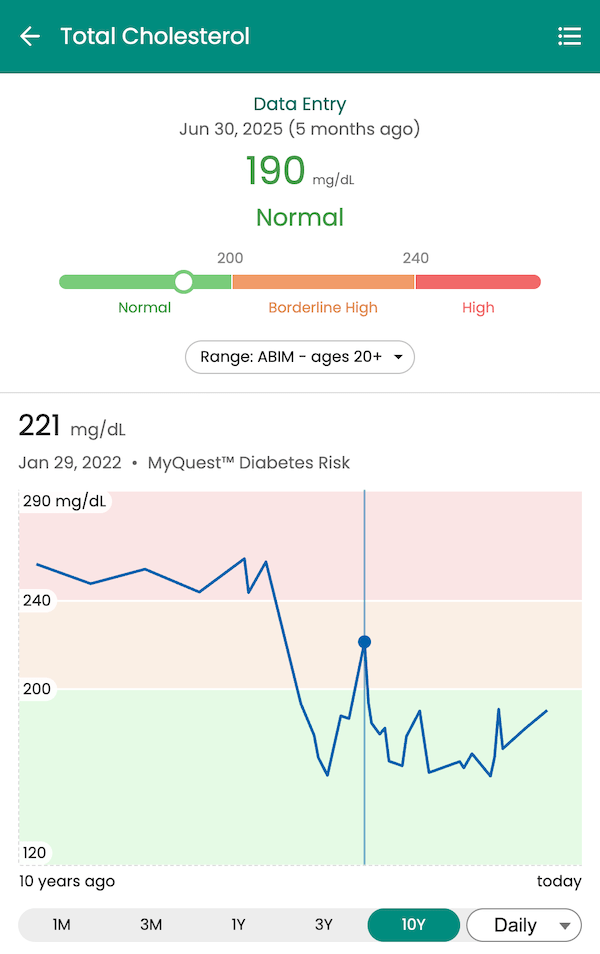
Different labs may report the same biomarker using different units. Glucose, for example, is often measured in mg/dL in the United States but in mmol/L internationally. Guava automatically converts these values and their reference ranges into a consistent format, allowing you to compare results without manual calculation.
LOINC Code Alignment:
Guava uses Logical Observation Identifiers Names and Codes (LOINC), a universal standard for identifying medical laboratory observations. This ensures that "LDL cholesterol" from Quest Diagnostics is recognized as the same biomarker as "LDL-C" from LabCorp, even if the naming conventions differ.
By unifying biomarkers and their units, the Provider Dashboard consolidates diverse data points into a comprehensive clinical overview. This makes it possible to identify trends across time and across labs, rather than interpreting each result in isolation.
Longitudinal Biomarker Tracking for Better Clinical Insights
A single lab result, like a fasting glucose reading, inherently offers a limited snapshot of a patient’s health. Although it's useful in some capacity, it fails to capture the dynamic progression of their health over time. Tracking that same marker over a year reveals whether their metabolic health is improving, holding steady, or declining.
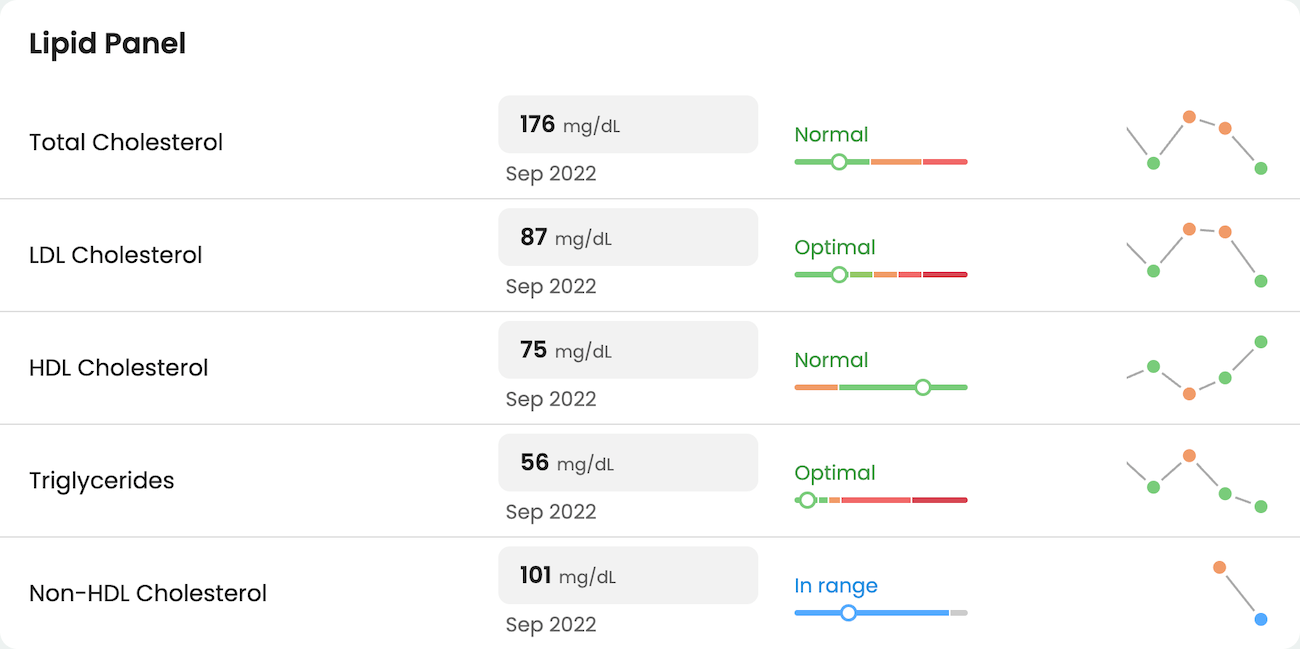
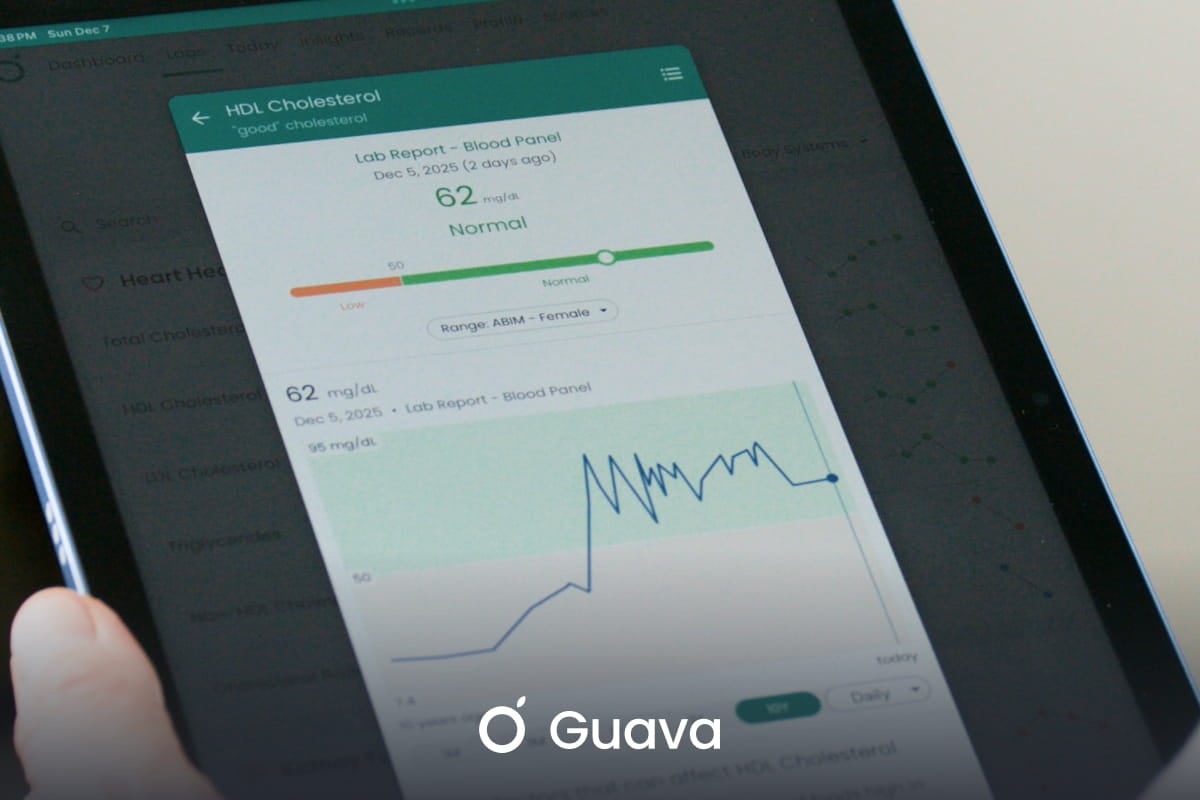
The Guava Provider Dashboard visualizes biomarker data over time through interactive charts. You can track individual markers, like hemoglobin A1c, liver enzymes, or lipid panels, and observe how they respond to interventions. Did a dietary change lower LDL cholesterol? Has thyroid medication brought TSH into its target range? These questions become easier to answer when you can see the full timeline at a glance.

- Dr. Mike Stone, Board-Certified Concierge Medicine Physician
This kind of proactive monitoring depends on having comprehensive, up-to-date information. When lab data from multiple sources is unified in one place, patterns that might otherwise go unnoticed become visible.
Custom Lab Ranges, Descriptions, and Biomarker Groups
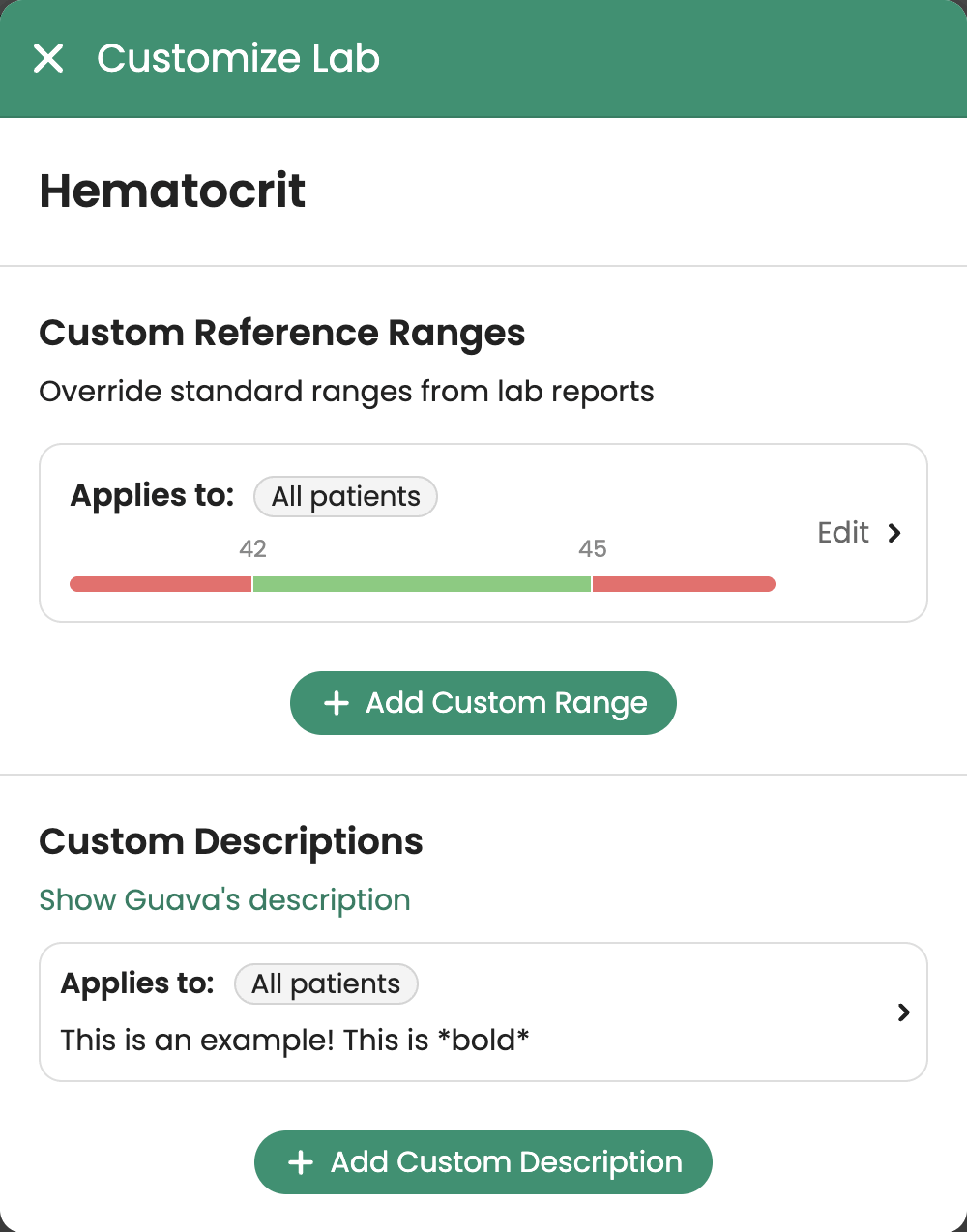
Not every patient fits neatly into standard reference ranges, and not all lab results are equally significant between patients. A functional medicine provider might track biomarkers that fall outside conventional panels and standards, while an endocrinologist managing diabetes may want tighter glucose targets for certain patients. The Provider Dashboard accommodates this variability through customizable reference ranges.
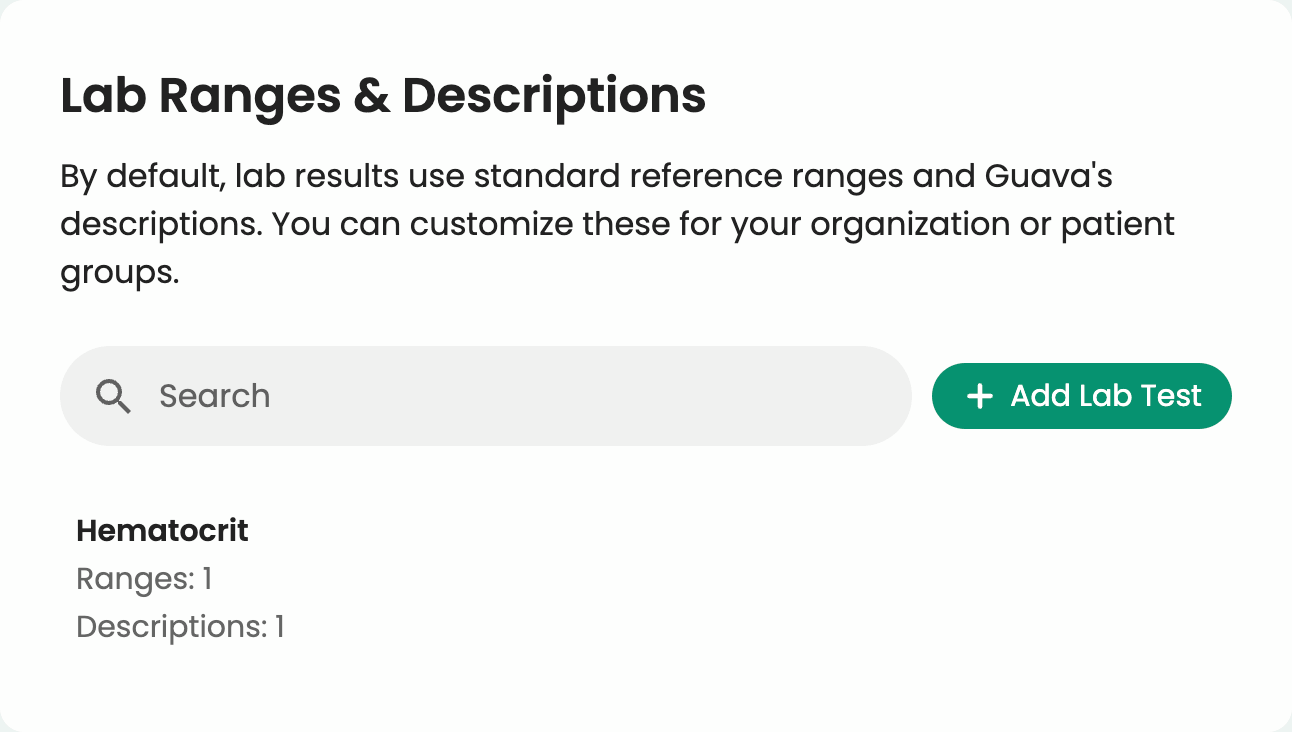
You can adjust target ranges and biomarker descriptions to reflect the unique health goals of individuals, your whole organization, or groups specified by age and sex. A prediabetic patient working to reverse insulin resistance might have a tighter HbA1c target than someone managing long-standing type 2 diabetes.
Custom descriptions allow you to explain why their targets might be different and what they can do to reach their goals. Guava lets you define these thresholds, so both you and your patient can track progress against meaningful benchmarks.
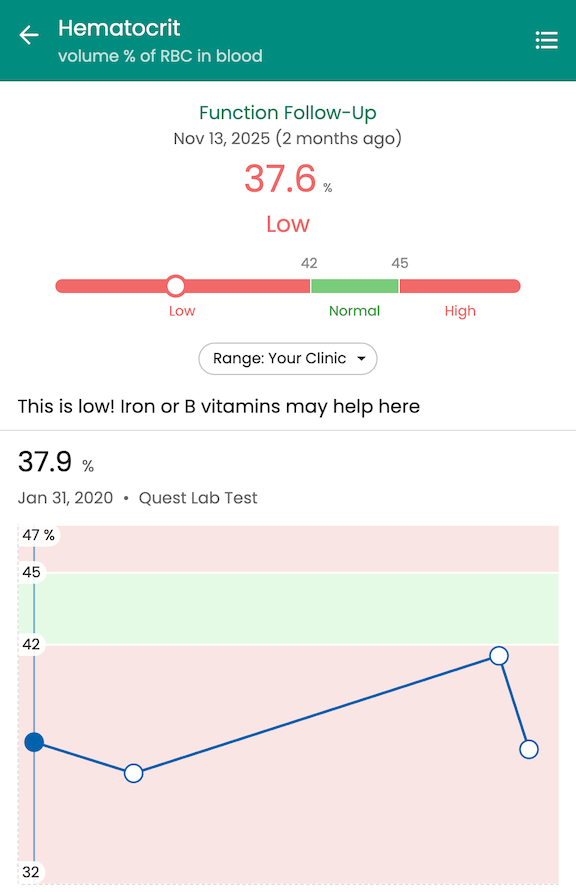
For context, Guava also displays the lab’s standardized reference ranges and provides reference ranges for common labs from trusted sources like the National Institutes of Health, Centers for Disease Control and Prevention, the American Board of Internal Medicine and the National Kidney Foundation, among others.
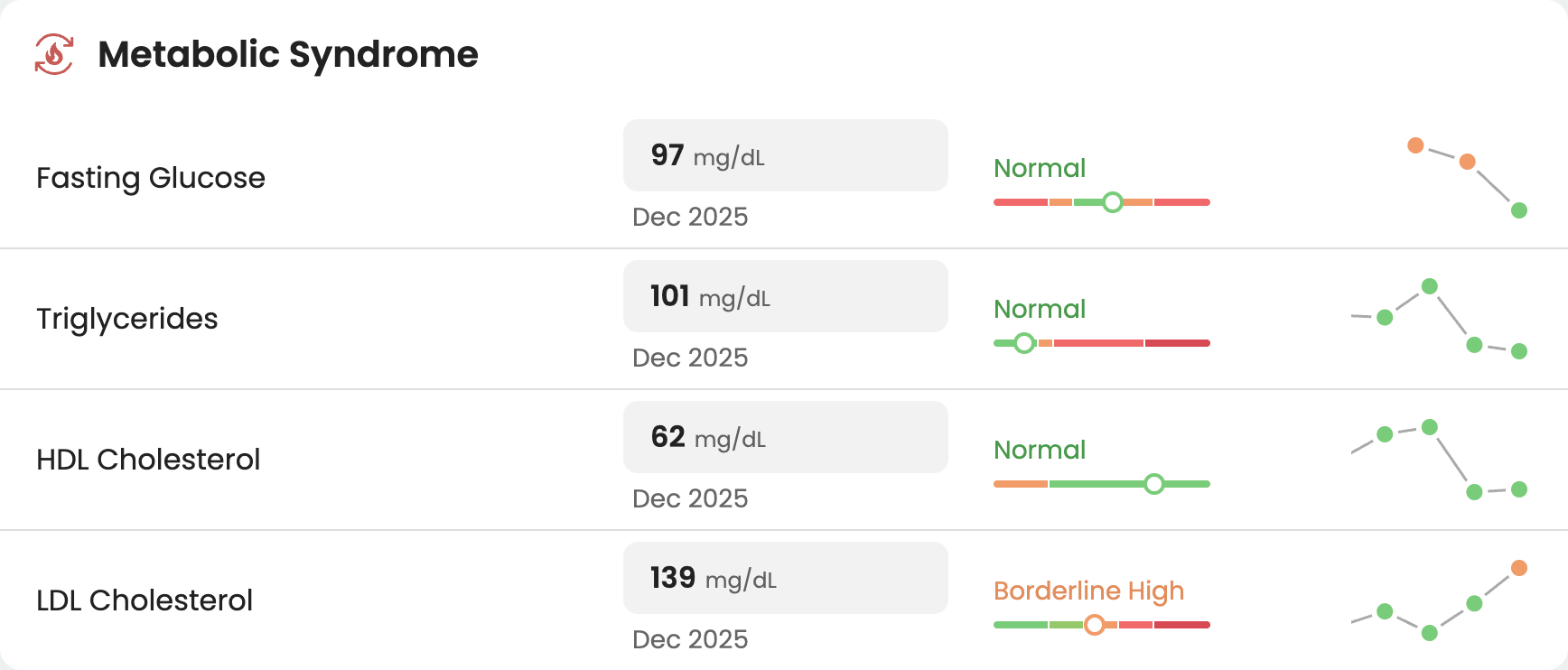
You can also create custom biomarker panels tailored to specific conditions or treatment protocols you utilize in your practice. If you frequently monitor patients for metabolic syndrome, you might build a group that includes fasting glucose, triglycerides, HDL cholesterol, and blood pressure.

When reviewing a patient's profile, you can pull up this panel in one click rather than searching for individual markers scattered across their lab history.
Integrating Labs with Wearables and Lifestyle Data
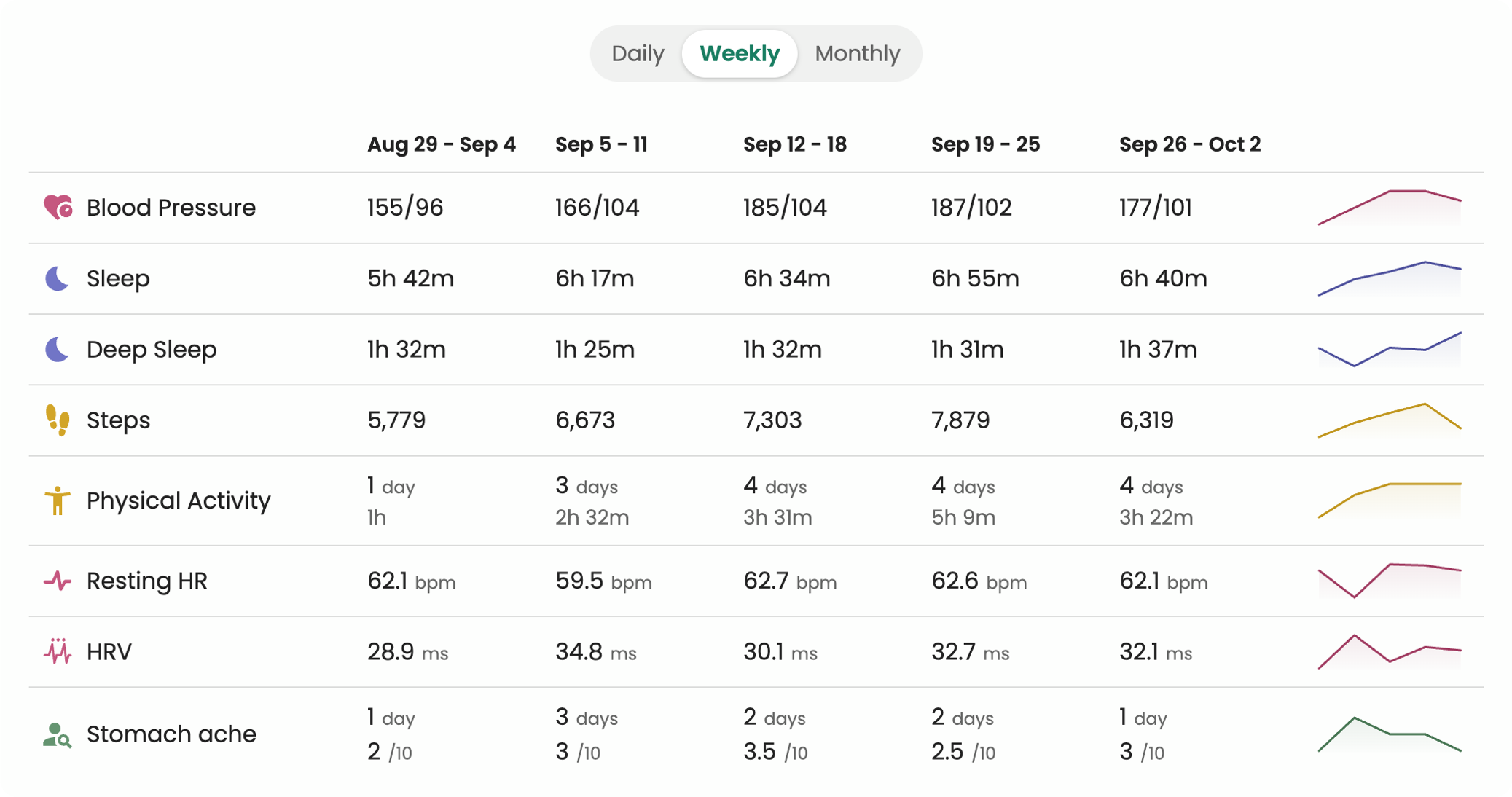
Lab results don't exist in a vacuum; they're influenced by a wide range of physiological and external factors. The Guava Provider Dashboard connects lab data with real-time inputs from wearables and daily health tracking, giving you a more complete picture of what is driving their results.
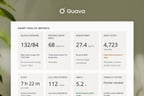
Learn more about Key Metrics in the Provider Dashboard.
For example, a patient with elevated fasting glucose might also be logging poor sleep and high stress through the Guava app. By viewing these factors alongside their lab trends, you can identify correlations that inform your treatment approach. Perhaps their blood sugar spikes after nights with less than six hours of sleep, or their inflammation markers improve during weeks with consistent exercise. These insights help you move from reactive care to proactive, data-informed decision support.
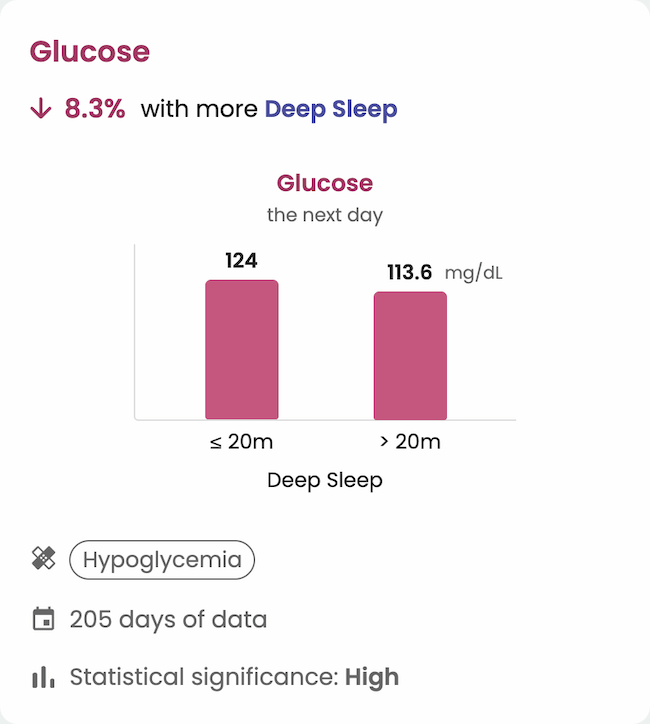
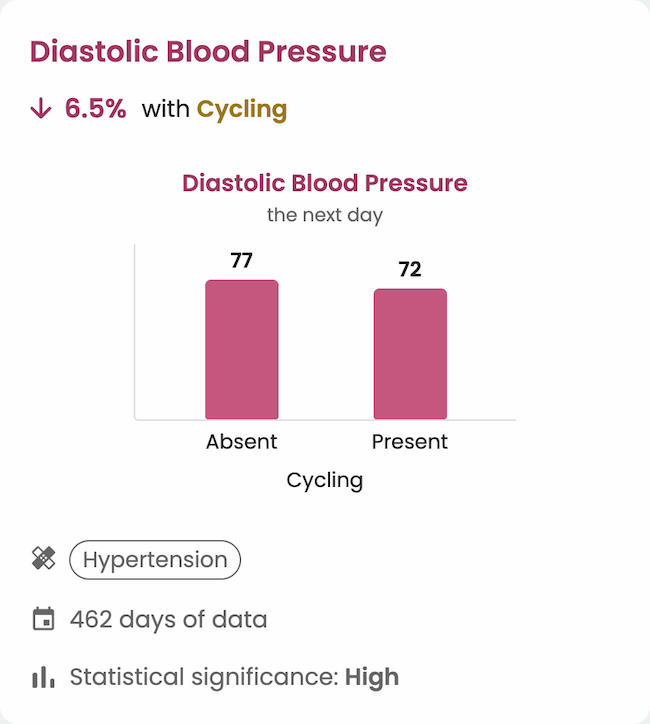
Learn more about Insights in Guava.
The platform integrates with a wide range of wearables and health apps:
- Smart rings: Oura and Ultrahuman
- Watches and fitness trackers: Garmin, Fitbit, WHOOP, Polar, Suunto, and Coros
- Continuous glucose monitors: Dexcom and FreeStyle Libre
- Blood pressure cuffs, scales, and thermometers: Withings, Omron, and iHealth
- Training and activity apps: Strava and Morpheus
- Health data aggregators: Apple Health, Health Connect, Google Health, and Google Fit, which bring in thousands of additional apps and devices
These sources sit alongside patient-reported data like symptoms, medications, and mood. This holistic view supports a more personalized approach to care, where interventions are guided by context that includes both lab values and your patients’ everyday lives.
AI Summaries for Chart Review and Patient Lab Reports
Unified, normalized lab data is also what makes useful AI summaries possible. With the Patient Summaries feature in the Provider Dashboard, Guava drafts a summary from everything connected to a patient's profile: lab results, records, conditions and medications, wearable data, patient-logged symptoms and medication adherence, and messages from Guava or Spruce. Summaries start from a reusable template and generate in one to three minutes for one patient, several patients, or your full panel. They can be written for clinicians or for patients.
Pre-Visit Chart Review
For chart prep, a provider-facing summary condenses lab history into a short brief instead of a long list of values. A labs section shows new and updated results with reference ranges, status, and trend direction, along with a short synthesis of the overall pattern. You can see which values moved and which crossed a threshold worth discussing before the visit starts.
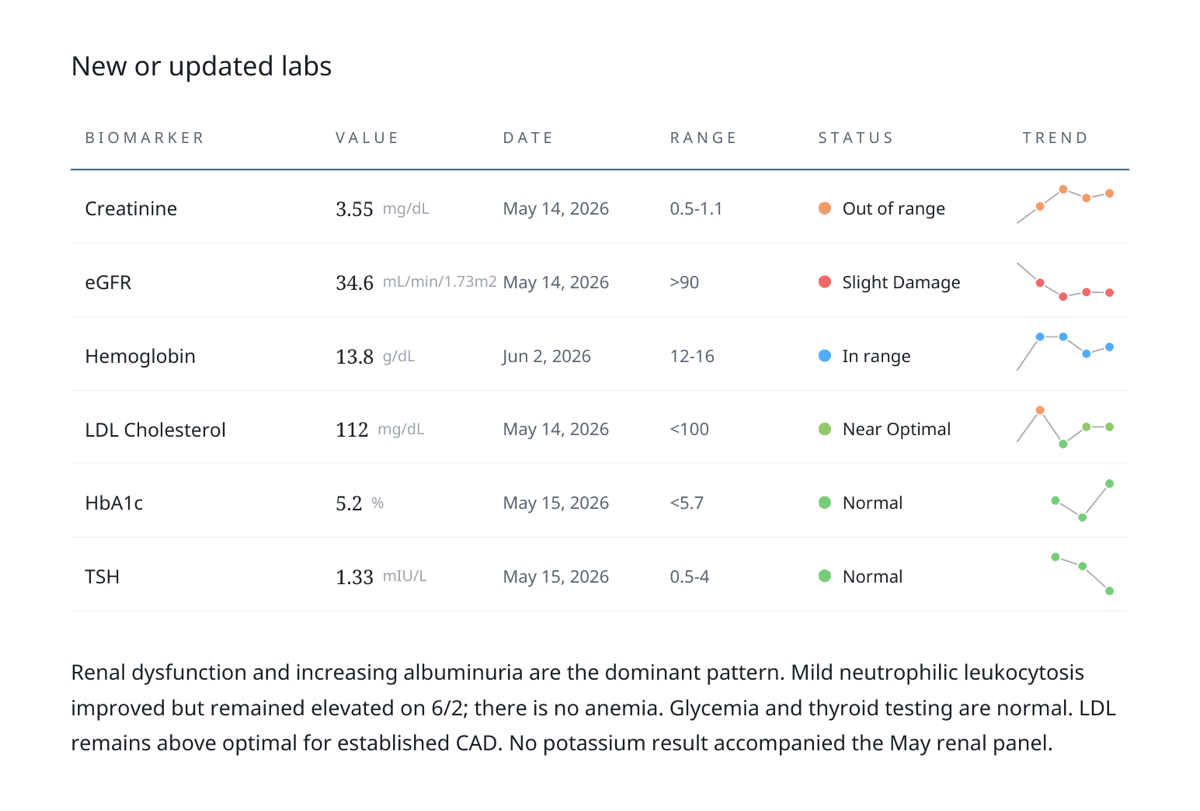
Guava also flags points of review, like conflicting sources or values that don't match across records, so you know where to look. Flags direct your attention without making clinical decisions, and nothing flagged is written back to the patient's EHR.
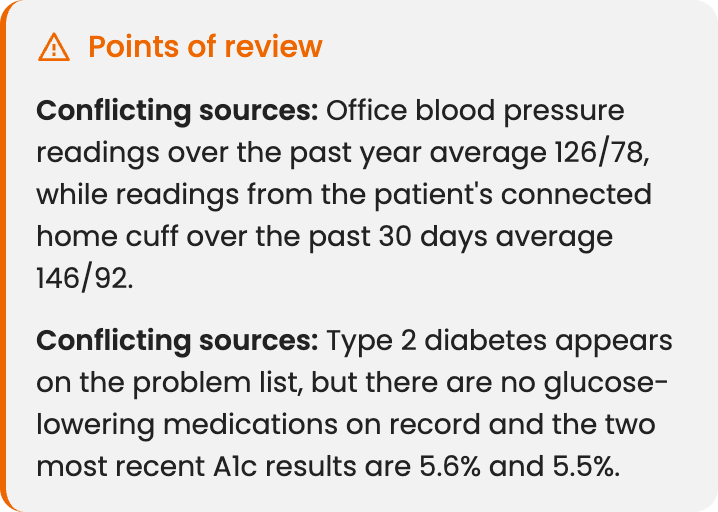
Learn more about AI clinical summaries for pre-visit chart review.
Explaining Labs to Patients
Research published in JAMIA Open suggests that giving patients portal access to their lab results may not be enough to improve their understanding. Patients also need context to make sense of what they're seeing.
In the Guava app, patients see the same unified lab history you do, presented in a user-friendly way. Results are organized by panel and body system, charted over time, and shown with the target ranges and descriptions you set, so patients can follow their progress between visits.


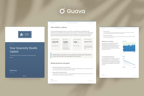
To explain results even further, you can provide physical, customized summaries branded to your practice. These patient-facing reports translate lab data into plain language: key values and what they mean, how they've changed over time, progress toward goals, and next steps from the care team.
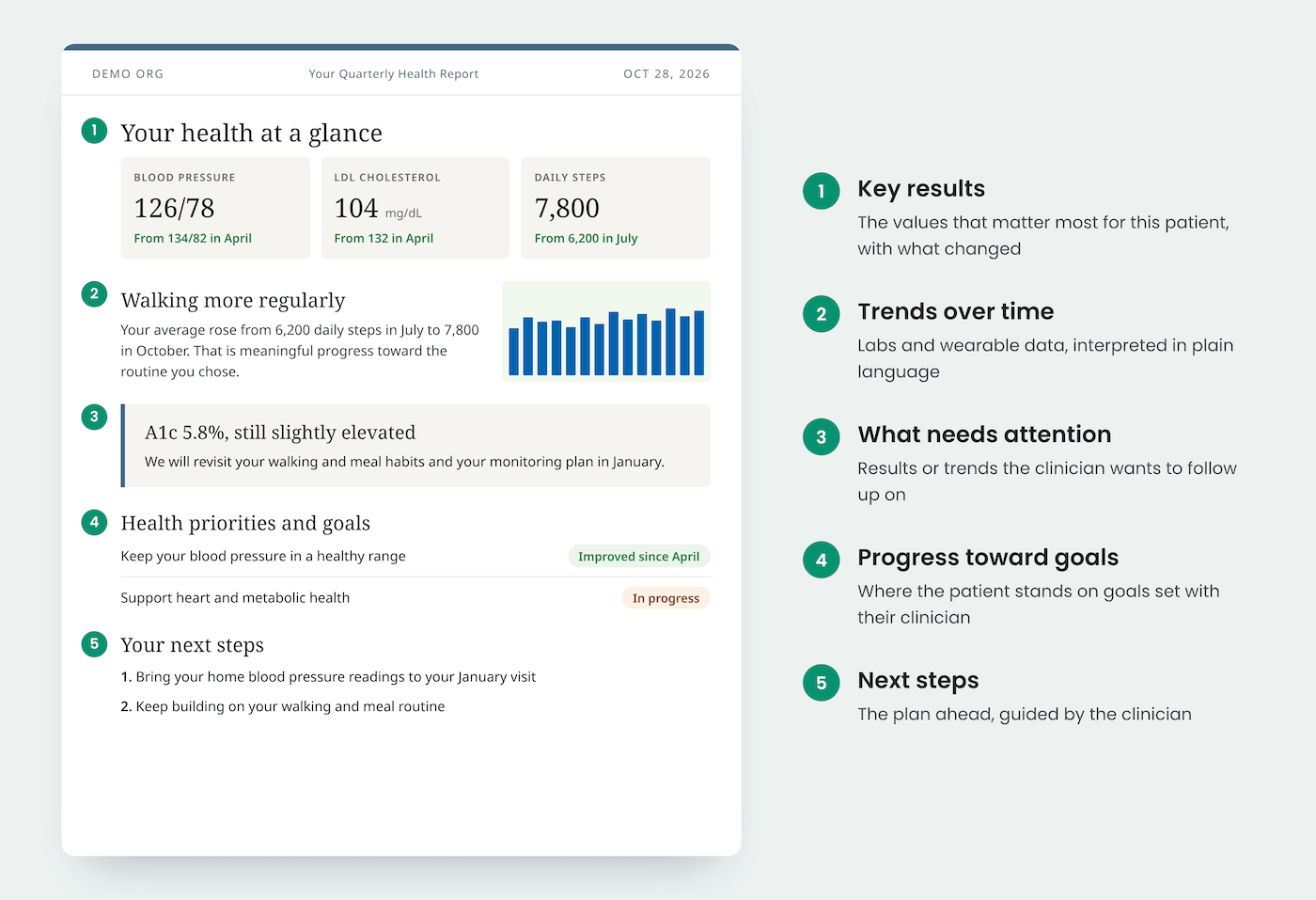
Reports can go out on whatever cadence fits your care model, such as weekly during a new protocol, quarterly for ongoing biomarker tracking, or after each new lab panel. Before anything reaches the patient, the draft opens in a review screen where you can edit language, remove sections, and add your own interpretation. Nothing is shared until a clinician signs off.
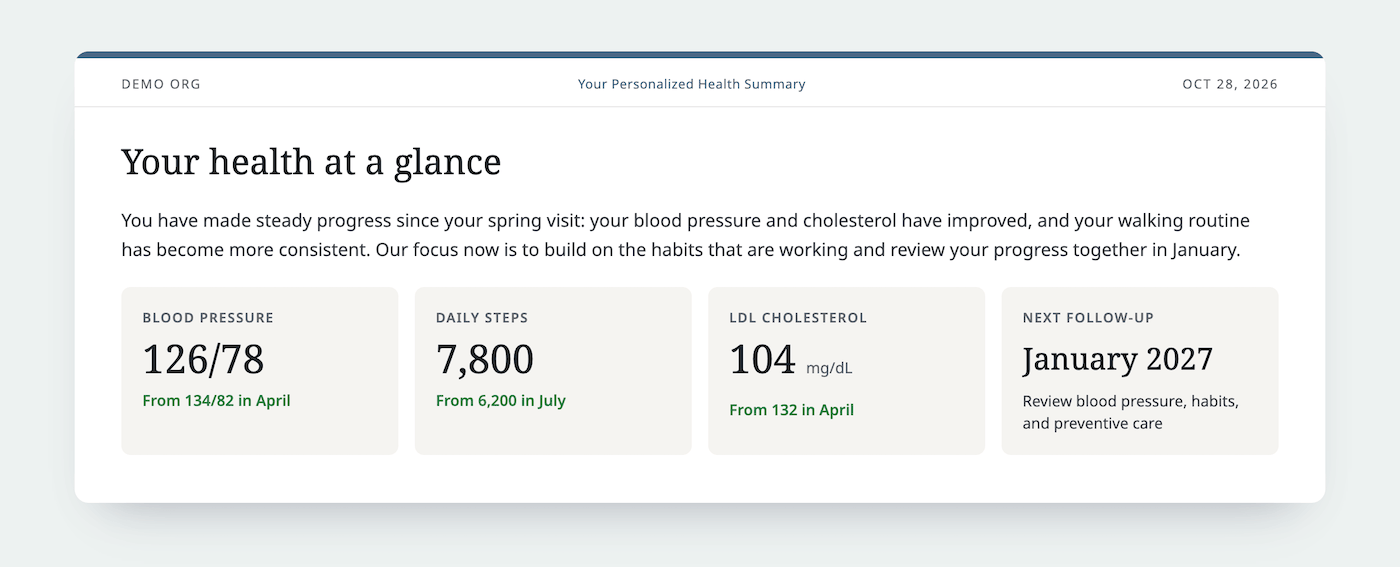
Learn more about patient-friendly medical reports using AI summaries.
Where Guava Fits in the Health Data Landscape
Clinicians working with lab data today typically rely on one of several approaches, each with trade-offs:
- EHR-native lab views (e.g., Epic, Cerner/Oracle Health) provide lab results within the system, but are limited to data generated within that health system's network. Results from outside labs, direct-to-consumer tests, or prior health systems often require manual entry or faxed records.
- Standalone patient portals (e.g., MyChart, patient-facing Quest/LabCorp portals) give patients access to their own results, but these portals are typically tied to a single lab or health system and do not aggregate data across sources.
- Health data aggregation platforms (e.g., Guava, CommonHealth, Apple Health Records) aim to pull data from multiple sources into a unified view. Guava is specifically designed for both providers and patients, offering not just aggregation but normalization, longitudinal tracking, custom reference ranges, wearable data integration, and AI summaries for clinicians and patients.
What distinguishes Guava from general-purpose health record aggregators is that it combines a clinical workflow built for providers with a consumer-grade experience for patients. Guava also works alongside the EHR your practice already uses through direct integrations, so clinicians can act on lab data across visits and systems, while patients can view, understand, and share their own results.
Who Benefits From a Unified Lab Data View?
The Provider Dashboard is designed for clinicians who prioritize continuity, collaboration, and patient engagement. This includes:
- Concierge and Direct Primary Care Physicians: You manage long-term relationships with patients who often see specialists or travel for care. Unifying lab data from multiple sources helps you maintain a comprehensive view without relying on external systems, and regular patient reports show members the value of their care between visits. Read more →
- Functional and Integrative Medicine Providers: You track biomarkers that extend beyond standard panels and work with patients on personalized protocols. Custom biomarker groups and patient-specific reference ranges support this approach. Read more →
- Care Coordination Teams: When multiple providers collaborate on a patient's care, like a primary care physician, endocrinologist, and health coach, having a shared view of lab trends improves communication and reduces redundant testing.
- Patients Seeking Ownership of Their Health Data: Beyond the clinical benefits, Guava empowers patients to consolidate and understand their own lab history. Patients already use the platform to prepare for appointments, track progress toward health goals, and share information with new providers.
Privacy and Security
Guava is fully HIPAA-compliant and takes the privacy and security of your health data seriously. All information stored in Guava is secured and encrypted using industry-standard protocols. We also safeguard data from unauthorized access and tampering by using modern cloud technologies built specifically for HIPAA compliance.
Read more about privacy and security.
Get Started With the Guava Provider Dashboard
The Guava Provider Dashboard brings results from across systems into one intuitive, longitudinal view, giving you the clarity to make informed decisions and deliver more personalized care.
Start for free and see how Guava can streamline your workflow.