Any patient seeking high-touch care wants to understand whether their care plan is improving their health. The evidence, however, is often scattered across lab panels, chart notes, imaging reports, and wearable data that no one has time to piece together.
A patient-friendly medical report compiles that information for you and your patients. It turns EHR data, physical records, labs, and wearable data into a single report that shows where a patient started, what has changed, and what comes next. With AI medical summaries, clinicians can draft these reports in minutes instead of hours. For concierge, direct primary care (DPC), functional medicine, and longevity practices, they have become one of the clearest ways to show patients the value of their care between visits.
This guide covers what a patient-friendly medical report is, how it differs from an after-visit summary, and how AI can draft these reports for you. You'll also learn how to choose a reporting cadence and focus that fit your practice, and what to look for in a patient summary tool.
- What is a patient-friendly medical report?
- Patient reports vs. after-visit summaries
- How AI medical summaries help clinicians write patient reports
- How clinician review works
- How often to send patient reports and what they should cover
- What to look for in a patient summary tool
- How Guava's AI medical summaries compare
- How concierge, DPC, functional, and longevity practices use patient reports
- How to create a patient report in Guava
- Frequently asked questions
What is a patient-friendly medical report?
A patient-friendly medical report is a plain-language overview of a patient's health and progress, created by their care team from records, visit notes, lab results, and wearable data. It goes beyond restating results: it includes the clinician's interpretation of what has changed and a plan for what comes next. It also translates clinical information into something a patient can read, understand, and act on.
Unlike the after-visit summary, this document doesn't have a settled name in practice. You may see it called a patient medical summary, patient progress report, patient health summary, or patient care summary, and practices don't always mean the same thing by each. In this guide, a patient report is the finished document a patient receives, including their clinician's interpretation and plan. An AI medical summary is the AI-generated first draft that a clinician reviews, edits, and turns into that report.
The use of patient-facing reports in practice is more important than it might seem. Research published in JAMIA Open (via AHRQ) suggests that simply giving patients direct access to lab results through a portal may not be enough to improve their understanding. Patients also need context and explanation to make sense of what they're seeing. A patient-friendly report provides necessary context by turning raw results into a structured, readable narrative.
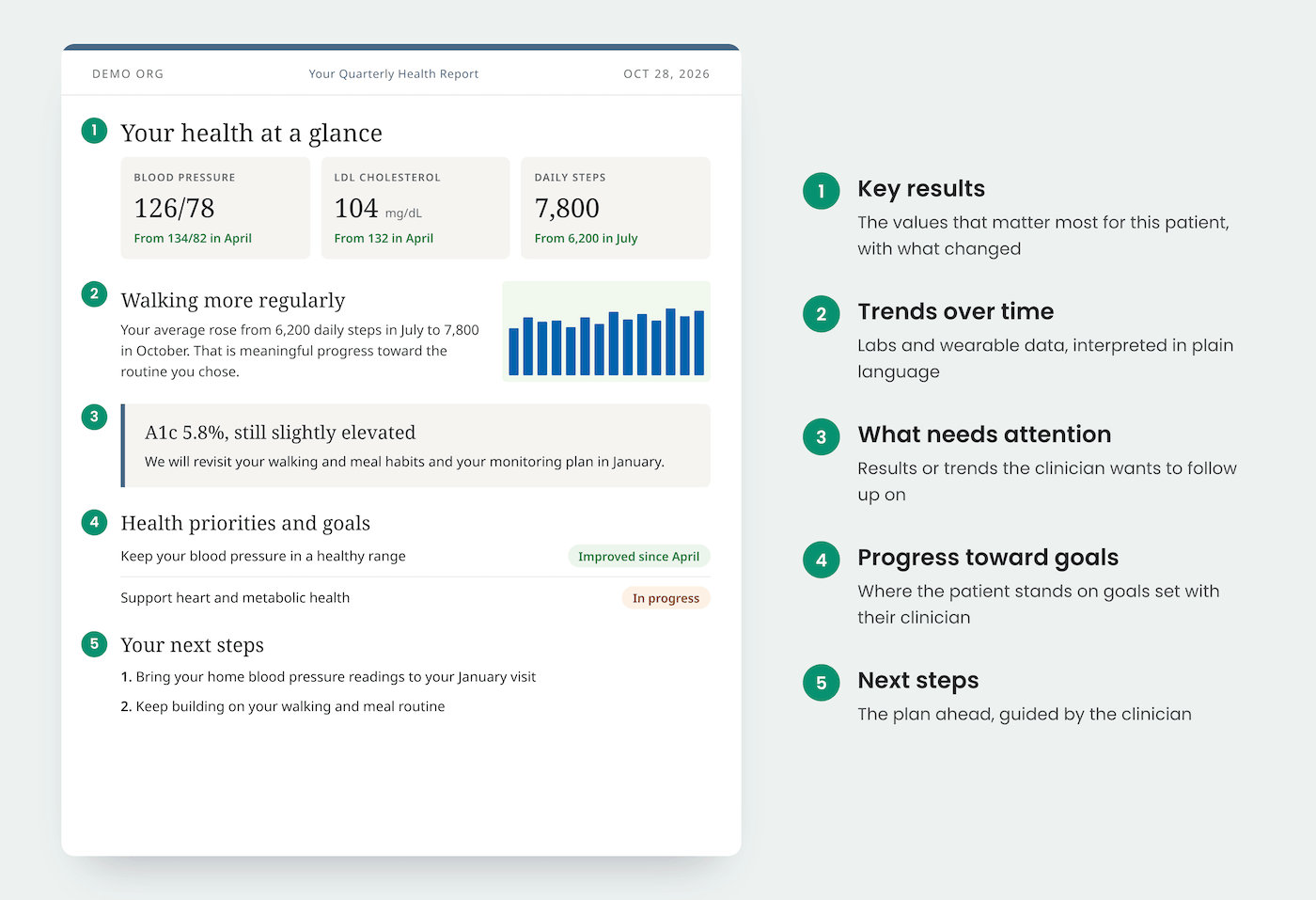
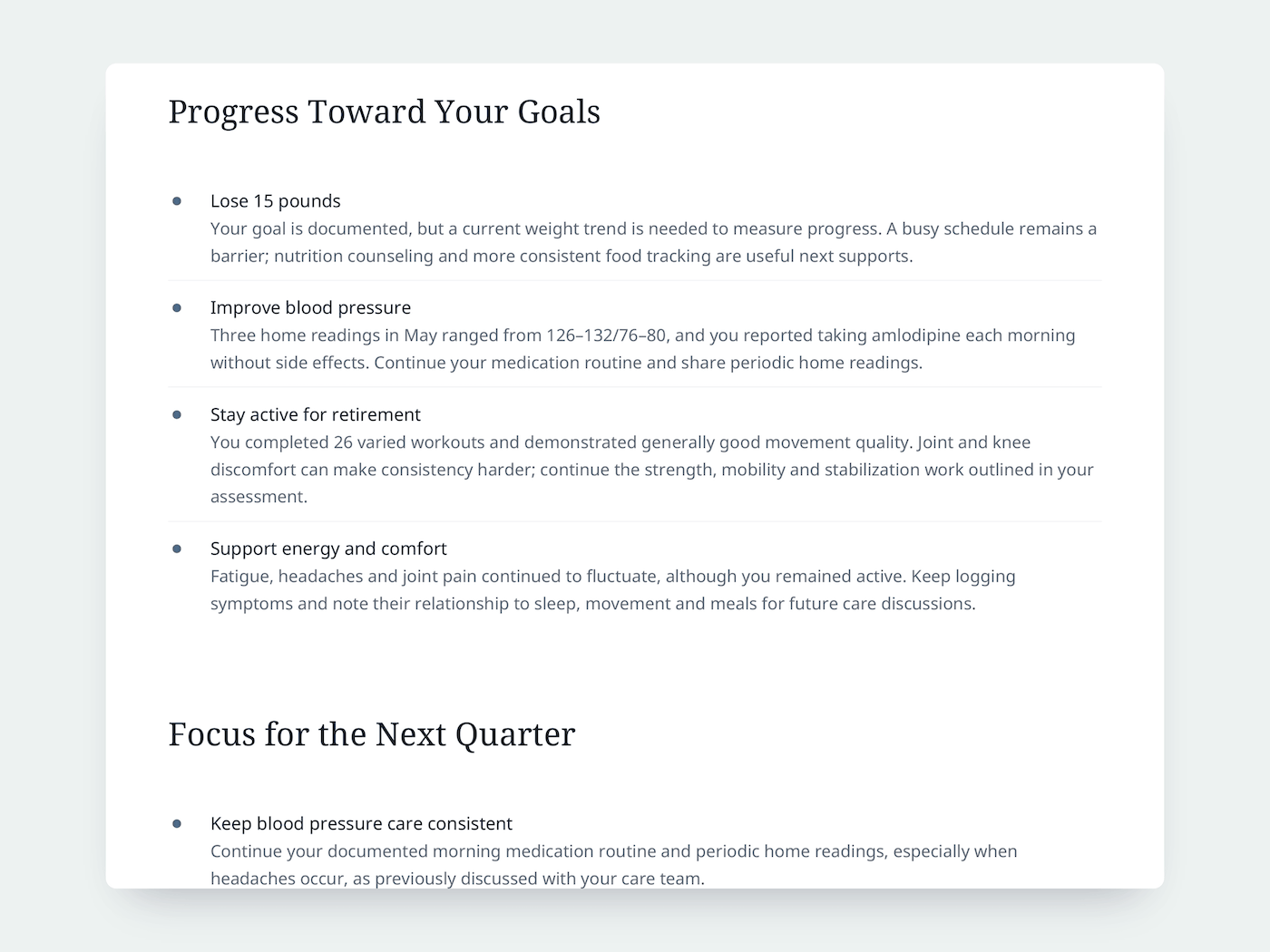
A strong patient report typically includes:
- Key results: the lab values and measurements that matter most for this patient, with context on what they mean
- Trends over time: how biomarkers, symptoms, or wearable metrics like sleep and activity have changed since the last report or a defined period of time
- Progress toward goals: where the patient stands on the goals set with their clinician
- What needs attention: results or trends the clinician wants to flag or follow up on
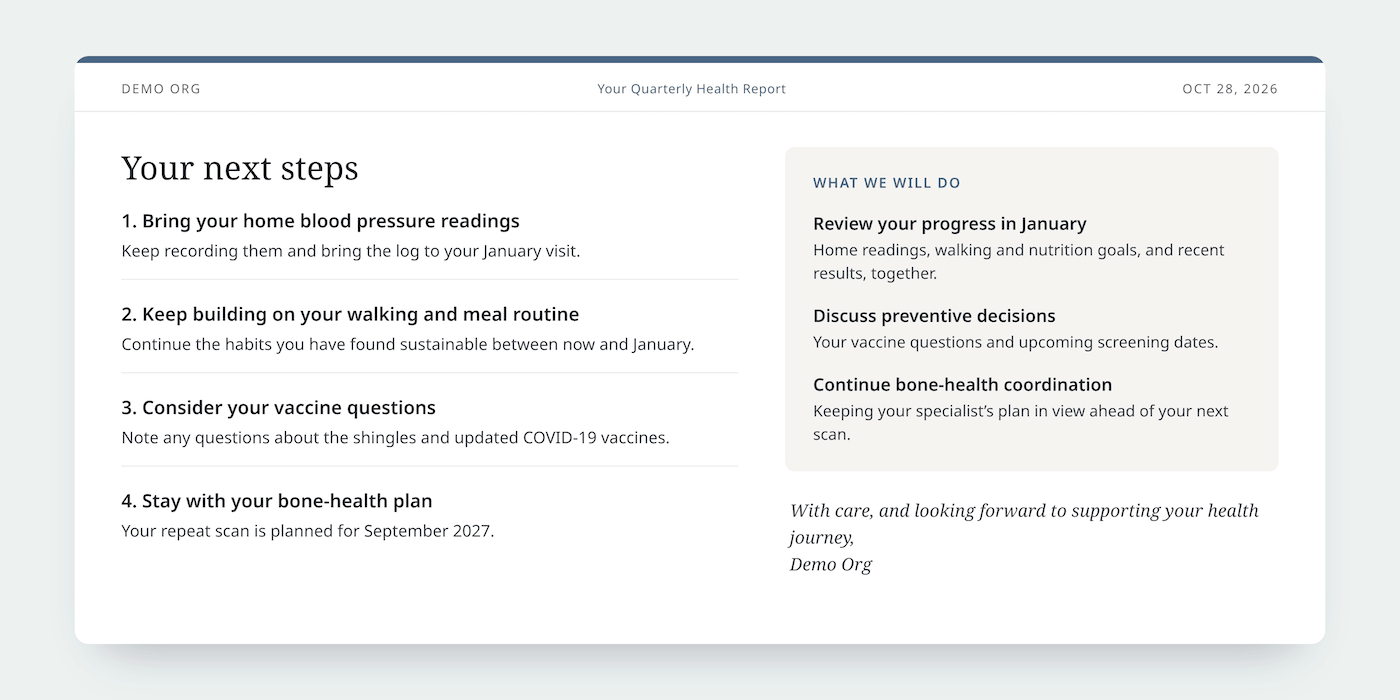
- Next steps: what the care plan looks like going forward and what the patient should focus on
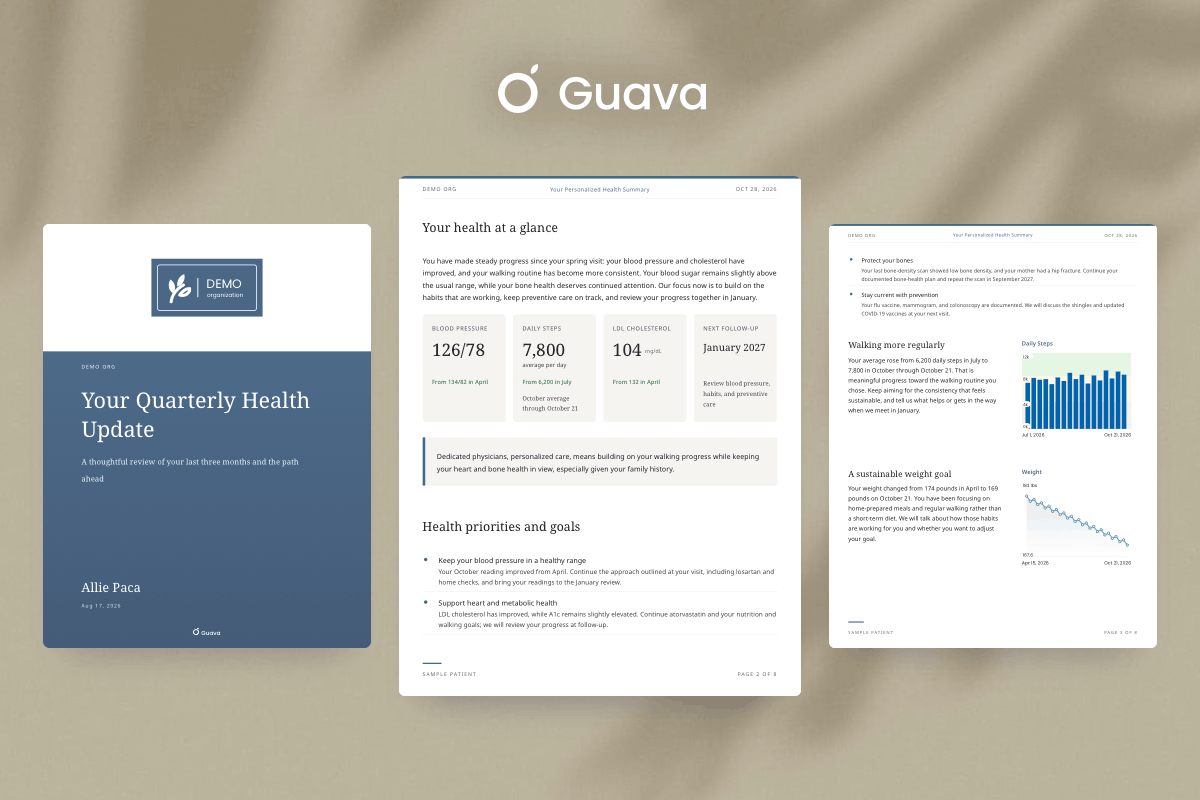
The best reports read like a personal note from the patient's physician, supported by data, rather than a raw data export. They can carry your practice's branding to match the rest of the patient's experience, and they should highlight what has changed and why those changes matter for the patient's health. Above all, the report should tell the story of the patient's health journey through the eyes of their caring partner, the physician.
Beyond showing progress, well-structured reports can also support shared decision-making and goal setting. A peer-reviewed NIH/PMC study on patient engagement, decision-making, and behavior change finds that involving patients in their care decisions and reinforcing shared goals over time meaningfully improves engagement and health outcomes. Patient reports are a practical way to support that process, giving patients the context they need to participate in decisions about next steps and reinforce the goals they've already set with their clinician. A patient-facing report should leave the patient with a clear sense of direction and support, and demonstrate the value of the care they're receiving.
What is a patient report compared to an after-visit summary?
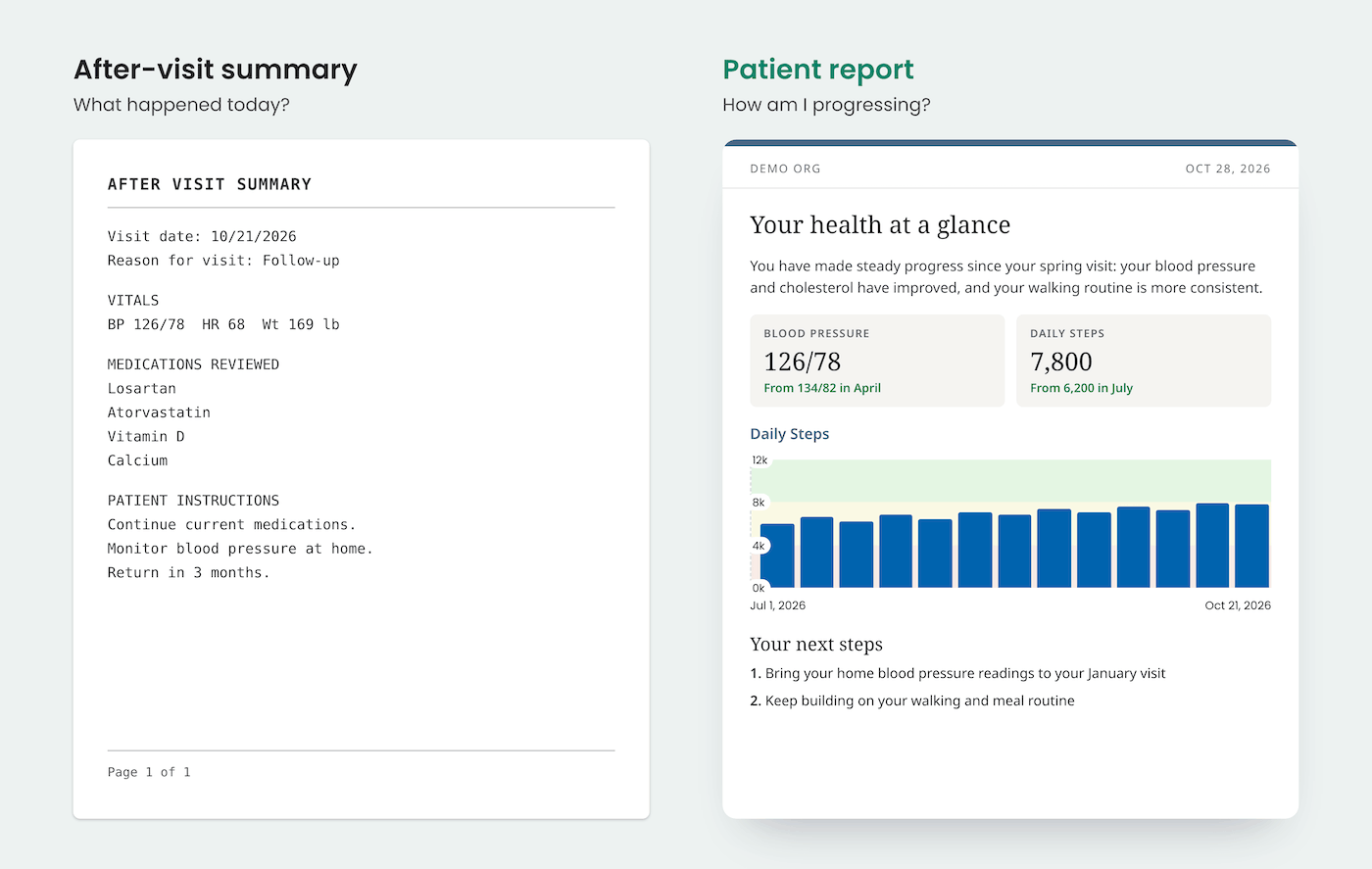
An after-visit summary documents a single appointment, while a patient report looks across time and data sources to show progress. Both have a place, but they answer different questions.
| After-visit summary | Patient-friendly medical report | |
|---|---|---|
| Scope | One visit | Weeks, months, or a full care period |
| Data sources | Notes from that encounter | Records, lab results, wearable data, clinical notes, and relevant messages from every encounter within a given time period |
| Main question it answers | What happened today? | How am I progressing? |
| Clinical interpretation | Usually limited to that visit's findings and instructions | Analysis of trends across time, flagged concerns, and a plan for what comes next |
| Typical timing | Right after an appointment | On a cadence set by the practice (weekly, monthly, quarterly, or annually) or after new labs |
| Format | Often a standard EHR printout, which is generally discarded and unread by patients after leaving appointments | Customized to the practice and the patient |
For practices built on ongoing relationships, such as concierge, DPC, and functional medicine, the patient-friendly medical report is likely to be the more valuable document. It shows patients the arc of their care, comparing their health status today to six months ago, a year ago, or even ten years ago. That's not to say the after-visit summary lacks value. As a snapshot of a single moment in time, it is a useful data point, and after-visit summaries often serve as building blocks for fuller patient reports.
How do AI medical summaries help clinicians write patient reports?
A patient report is the document the patient receives. An AI medical summary is the AI-generated first draft of that report. In Guava, the AI pulls a patient's entire chart history, lab results, and wearable data into one place and drafts a patient-friendly report that goes beyond restating the data: it interprets trends, flags what needs attention, and outlines next steps. The clinician reviews, edits, and approves the report before the patient ever sees it.
Despite the value patient reports provide, writing them by hand can take enormous amounts of time. A physician must open the chart, compare the latest labs with previous panels, scan weeks of wearable data, and translate it into language a patient will understand. Multiplied across a full patient panel, regular reports quickly become impractical.
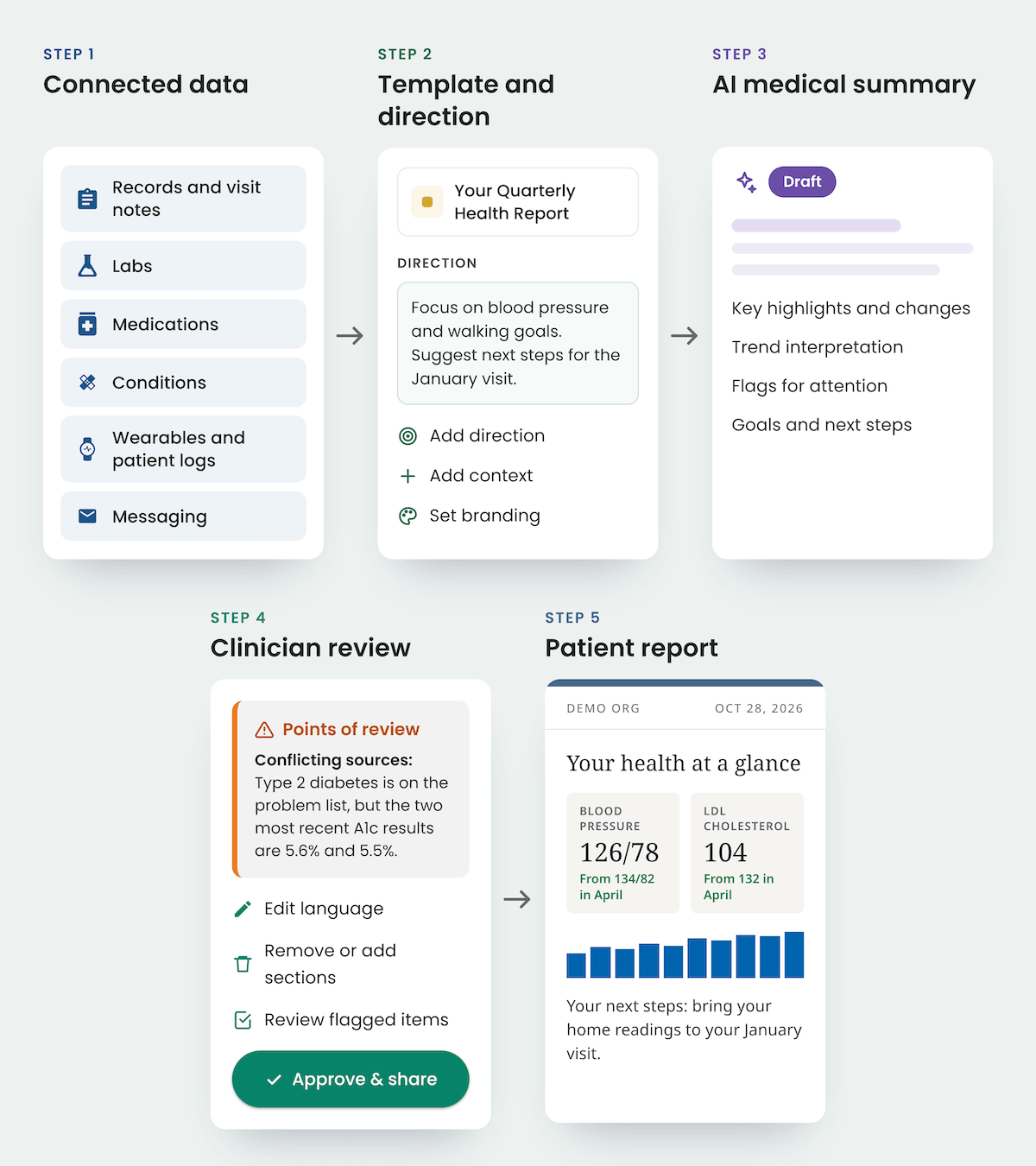
AI medical summarization software changes the starting point. In Guava, the draft is generated from the data already connected to the patient's profile:
- Records: the clinical information in the patient's chart, including procedures, studies, medications, conditions, family history, etc.
- Labs: current and past results, so the report can show how values have changed
- Patient-generated data: trends from the patient's connected wearables, symptom logging, and medication adherence
From that data, the AI drafts a report organized into clear sections, which can include:
- Key highlights and changes since the last report
- Interpretation of trends across labs and wearable data
- Flags for anything that needs attention
- Goals and next steps
Clinicians decide how much of the direction comes from the AI. They can instruct it to suggest goals and next steps, or write that guidance themselves during review.
How does clinician review work before a report reaches the patient?
Every patient report in Guava starts as an AI draft and only becomes final once a clinician approves it. Since the report is written for the patient, this step protects both accuracy and trust. Patients tend to read their reports closely, sometimes more than once, and may share them with family members or other providers. A detail that's unclear or incorrect carries more weight in that setting than it would in an internal chart note.
To make review faster, Guava scans each draft and highlights anything worth a closer look before you approve it. That includes places where two records disagree, sensitive information, and values that don't match from one source to another. These highlights point you to where your judgment is needed. They don't make clinical decisions, and none of the flagged items are written back to the patient's EHR.
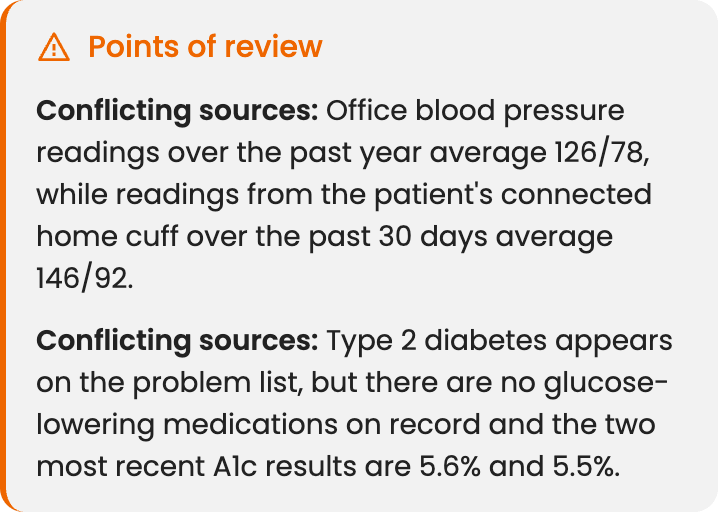
From there, the clinician decides what the patient sees. You can correct details, rewrite sections in your own voice, add context the data can't capture, or remove anything that isn't ready to share. Once you sign off, the draft becomes the patient's report.
AI summaries can also be written for clinicians instead of patients. Learn how they support pre-visit chart review in our guide to AI clinical summaries.
How often should you send patient reports, and what should they cover?
There's no single right cadence or format. Patient reports work best when they match how your practice delivers care, so both the timing and the focus of each report should follow your practice's needs.
Choose a cadence that fits your care model
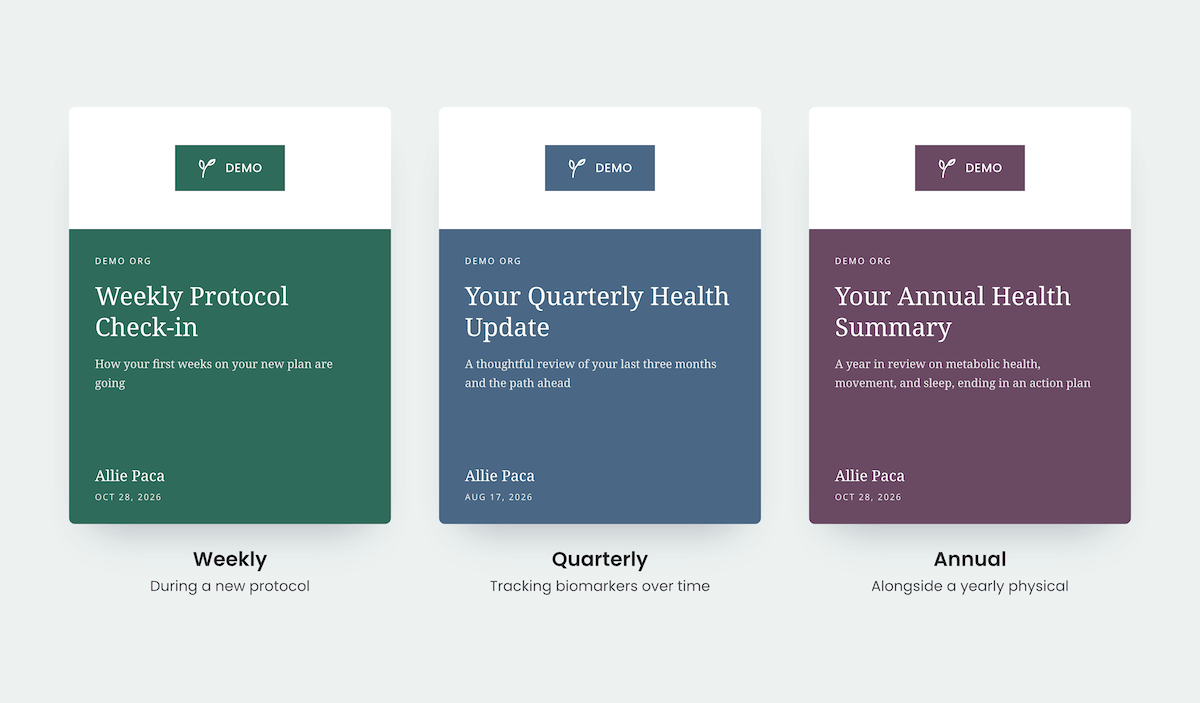
- Weekly: for patients starting a new protocol, treatment, or medication, where frequent check-ins keep momentum and catch issues early
- Monthly: for membership models where patients expect a regular touchpoint, even without a visit
- Quarterly: a common rhythm for longevity and functional medicine patients tracking biomarkers over time
- Annually: a year-in-review report alongside an annual physical
- Event-based: when significant lab results come back, a protocol has been completed, or there's been a change to the care plan
Cadences can also change as care evolves. A practice might send weekly reports during the first months of a protocol, then move to quarterly reports once the patient is stable.
Choose a focus that reflects how you practice
- Pillars of health: organize each report around the pillars your practice uses to frame care, such as sleep, nutrition, movement, and stress
- Most recent labs: center the report on a new panel and how it compares with prior results
- A specific goal or protocol: track the markers and behaviors tied to one plan, like improving metabolic health or recovering from an injury
- The full picture: a comprehensive review across records, labs, and wearable data, often paired with an annual visit
Because templates are reusable, a practice can set up each format once, such as a weekly protocol check-in, a quarterly pillar-based longevity report, or an annual DPC review, and apply it to the right patients every time.
What should you look for in a patient summary tool?
The right AI medical summary tool pulls from all of a patient's data, lets you customize every report, and keeps the clinician in charge of what gets shared. These five features are worth checking before you choose one.
1. Data sources
A report is only as useful as the data behind it. Look for a tool that brings together records, lab results, visit notes, wearable data, messaging history, conditions, medications, treatment plans, and more, so the patient report reflects the full picture rather than one slice of it.
2. Customization with templates, sections, and cadence
Every practice communicates differently, and every patient needs a slightly different report. A good tool lets you build templates and add or remove sections, so a longevity patient's quarterly report can focus on different areas than a DPC patient's annual check-in. It should also support whatever cadence and focus your practice uses, from weekly protocol updates to annual reviews built around your pillars of health.
3. Custom branding
A patient-friendly medical report is one of the most direct ways your practice connects with patients. Custom branding ensures each report reflects your practice's identity and communication style, strengthening the patient relationship and reinforcing the value of your care.
4. Clinician review and sign-off
AI should draft and summarize, but it should not decide. Choose a tool that allows you to make edits, correct information, and ensures that nothing reaches the patient until the clinician has reviewed and approved it. This keeps clinical accuracy and the clinician's voice at the center of every report.
5. Integrations with your existing systems
A summary tool should fit into the workflow you already have. Look for integrations with the EHRs and devices your practice and patients already use, so data flows in without manual entry.
How do Guava's AI medical summaries compare?
Guava's AI medical summaries were built around these criteria:
| What to look for | How Guava handles it |
|---|---|
| Data sources | Summaries draw on everything stored in Guava: records, lab results, visit notes, past visit summaries, condition and medication lists, patient-logged symptoms and medication adherence, messages, and wearable data. |
| Customization | Fully customizable with templates and the ability to add or remove sections, implement branding, and edit final wording |
| Cadence and focus | Generate summaries for one patient, multiple patients, or your full panel whenever your cadence calls for it, using templates built around your pillars of health, recent labs, or specific goals |
| Branding | Custom branding so summaries reflect your practice |
| Clinician control | Every AI-generated summary is reviewed and signed off by the clinician before it's distributed |
| Integrations | Integrates with EHRs including Hint, Elation, Cerbo, athenahealth, and more, as well as 100,000+ wearables and apps, like glucose monitors, smartwatches, BP cuffs, and smart rings |
Guava suits practices that want AI to accelerate the first draft of a patient-friendly medical report while keeping the clinician's sign-off as the final step before anything reaches a patient.
How do concierge, DPC, functional, and longevity practices use patient reports?
Practices built on high-touch, ongoing patient relationships use patient reports to make progress feel tangible between visits. Each model tends to use them differently, and the cadence often follows the care model:
Concierge medicine
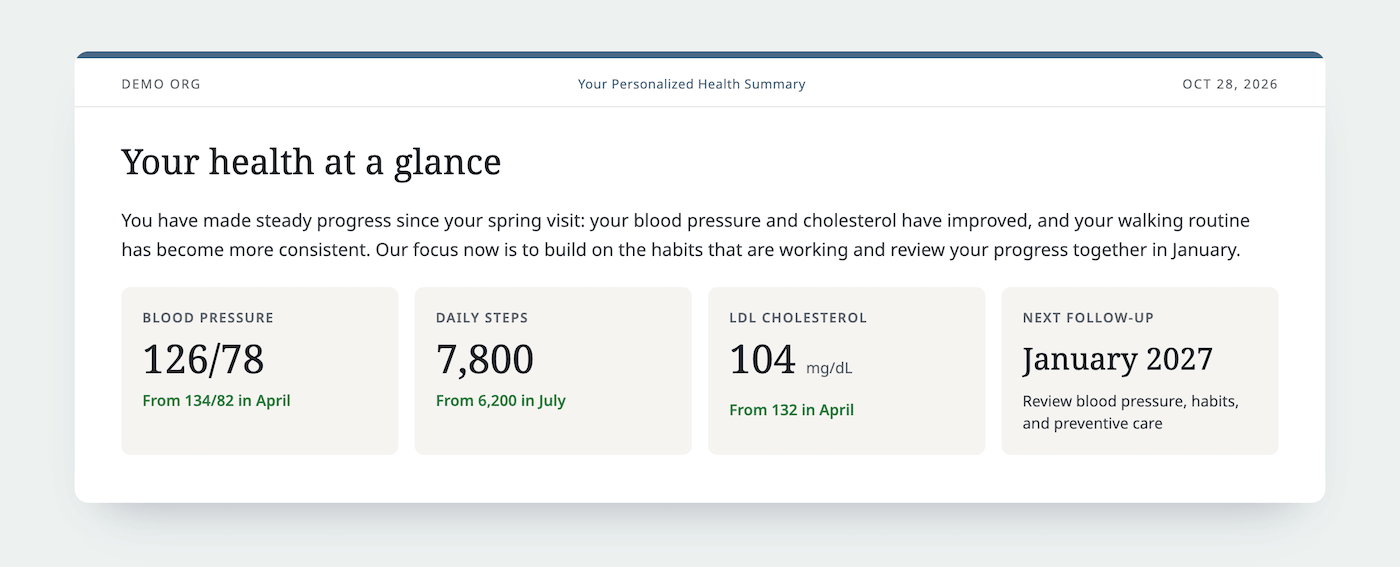
A monthly or quarterly patient progress report gives members a clear record of the care they receive, even during months without an in-person visit. Concierge patients pay for access and attention, so demonstrating value between appointments is essential.
Direct primary care
AI medical summaries allow DPC physicians to send meaningful updates after annual physicals or new lab work without adding hours of writing to their week. Clear reports also make it easier for patients to follow through on preventive care, medication changes, and recommended screenings. This is important for practices with large patient panels, where patients still expect a personal touch.
Functional medicine
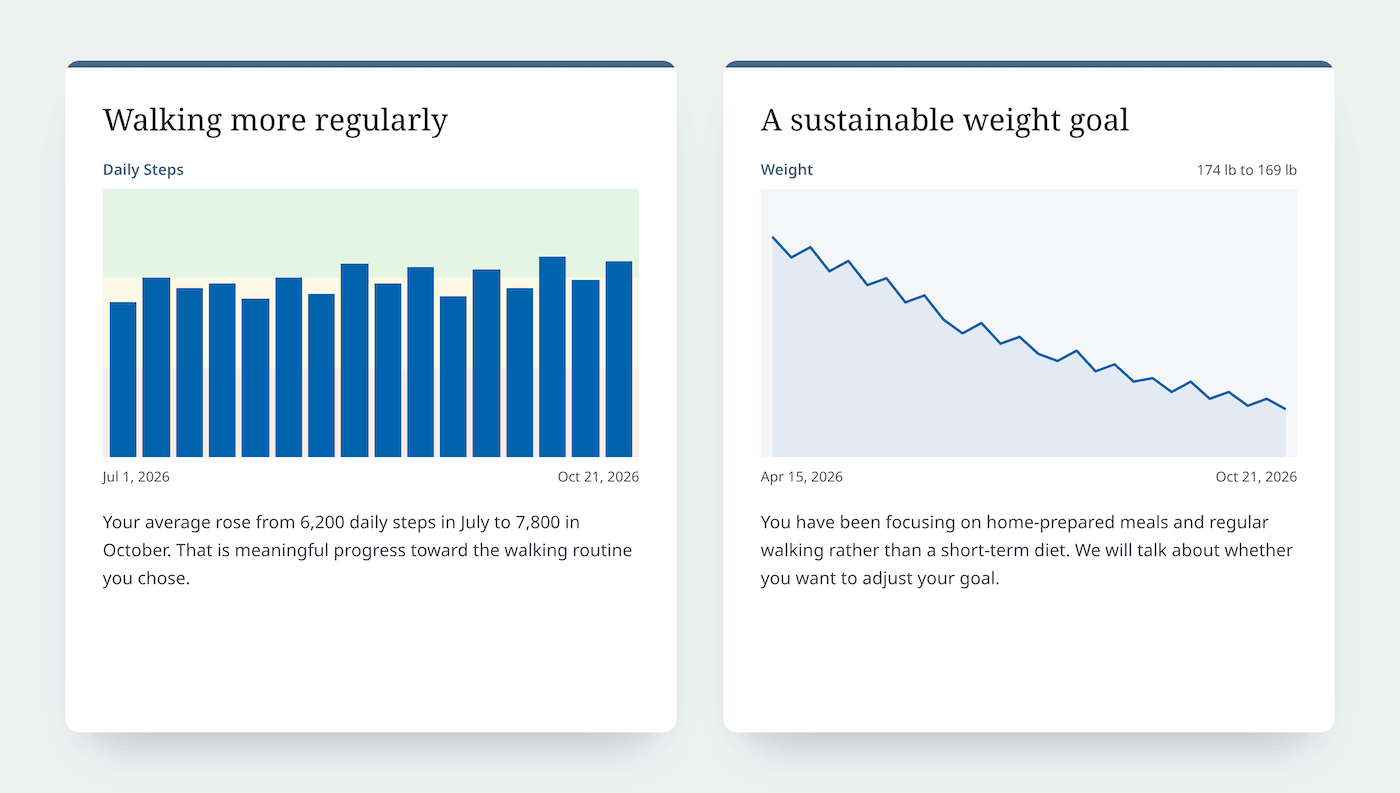
A patient report shows how key markers have changed since a protocol began, helping patients see how their effort translates into results. Many functional medicine practices send reports weekly or monthly during an active protocol, then shift the cadence to sending them with each new round of lab testing. This is especially valuable in functional medicine, where care plans often combine multiple interventions with repeated lab testing.
Longevity medicine
Reports turn a high volume of data into a focused summary of relevant trends, so patients see a data-supported clinical narrative instead of a spreadsheet. Quarterly reports organized around the practice's pillars of health are a good fit for longevity-oriented patients, who often track a wide range of biomarkers, wearable data, symptoms, nutrition, and supplement use over long periods.
Practices with a single, time-boxed visit, such as urgent care, for example, tend to rely on an after-visit summary, while practices built around ongoing relationships get more value from recurring patient reports that track change over time.
How do you create a patient-friendly medical report in Guava?
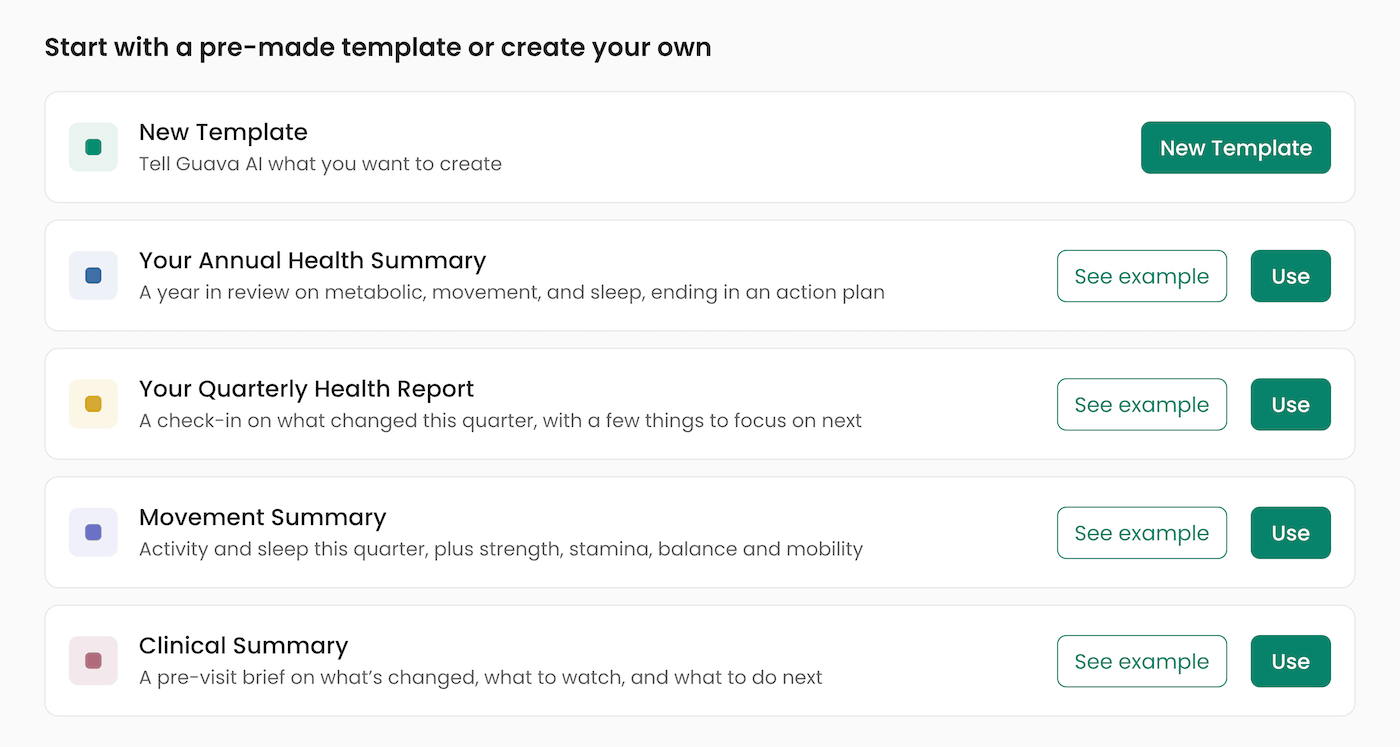
In Guava, patient reports are drafted with the Patient Summaries feature in the Provider Dashboard. Creating one takes three steps: choose a template, generate the AI medical summary, and review it before it's shared as a patient report. Most drafts are ready in one to three minutes.
Frequently asked questions
What is a patient-friendly medical report?
A patient-friendly medical report is a plain-language overview of a patient's health and progress, built from their records, lab results, and wearable data. It explains key results, trends over time, and progress toward goals, along with the clinician's interpretation and next steps.
What are AI medical summaries?
AI medical summaries are drafts generated by AI from a patient's records, labs, visit notes, and wearable data. In Guava, they help clinicians create patient-friendly reports that are reviewed, edited, and signed off on before they're shared with the patient.
What AI tools create patient-friendly medical reports from medical records?
Guava is one platform that uses AI to create patient-friendly medical reports. It drafts summaries from a patient's records, labs, and wearable data, which the clinician reviews and approves before sharing. Summaries can be customized with templates, sections, and practice branding.
Can AI generate a patient report that I review before it's sent?
Yes. In Guava, every AI-generated summary must be reviewed and signed off by the clinician before it's distributed to the patient. Clinicians can edit the draft, add context, and remove sections before approving it.
Can I customize AI-generated patient summaries with my own template and branding?
Yes. Guava's Patient Summaries feature is fully customizable with templates, custom branding, and the ability to add or remove sections. This lets practices keep a consistent format while tailoring each report to the patient.
Which patient summary tools integrate with Elation, Cerbo, Athena, or Hint?
Guava integrates with EHRs including Elation, Cerbo, athenahealth, and Hint, as well as wearables. This lets patient records and data flow into the platform, so summaries draw from information your practice already has.
What's the difference between a patient report and an after-visit summary?
An after-visit summary documents what happened during a single appointment. A patient report looks across records, labs, and wearable data over time to show how a patient is progressing toward their goals.
How often should a practice send a patient report?
It depends on the practice and the patient. Patient reports can be sent weekly, monthly, quarterly, or annually, or triggered by events like new lab results. Practices can also tailor the focus of each report, whether that's their pillars of health, the most recent labs, or progress on a specific protocol.
Are a patient-friendly medical report, a patient medical summary, and a medical progress report the same thing?
Often, yes, though there's no standard term. Some practices use "summary" for a recap of the data and "progress report" for a document that also includes interpretation and a plan. Whatever you call it, the version worth sending to patients includes both.
Turn patient data into progress patients can see
A patient-friendly medical report is more than a record of results. It carries the physician's interpretation of what has changed, flags what needs attention, and lays out the plan ahead, giving patients a clear sense of direction and giving practices a simple way to show the value of ongoing care. With AI medical summaries handling the first draft, clinicians can send thoughtful, branded reports on whatever cadence fits their practice, without rebuilding each one from scratch and while keeping full control over what patients receive.