An AI clinical summary is a structured, clinician-facing brief that can pull a patient's labs, wearable data, and records like diagnoses, medication history, and more into one document before an appointment. It functions as an AI medical chronology for clinical use: an ordered view of what has happened, what has changed, and what needs a decision before the visit begins. Instead of opening multiple portals and scrolling through years of notes, clinicians get a short, organized overview of what's relevant right now. For practices juggling packed schedules, a well-built summary changes how every visit starts and can save significant administrative time.
- Chart assembly is the hidden cost. Pre-visit chart review takes significant clinician time, largely because records are scattered across EHRs, portals, and file formats rather than assembled in one place.
- One brief instead of many portals. An AI clinical summary consolidates labs, medication changes, wearable trends, and outstanding orders into a single provider-facing brief.
- Template, generate, review. Guava summaries start from a reusable template, generate in one to three minutes for one patient or a full panel, and go through provider review before use.
- Built from every connected source. Guava's AI summaries pull from direct EHR integrations like Hint, Elation, Cerbo, and athenaOne, plus patient-connected portals, uploaded records, wearables, and patient-logged data.
- Flags guide the review. Guava flags likely conflicts and discrepancies for clinicians to review.
- The same engine works for patients. The same system can also generate patient-facing progress reports, giving practices one consistent source of truth on both sides of the visit.
What Pre-Visit Chart Review Costs Practices
For high-touch practices, thorough medical record review is essential, but it also eats up significant time. Time slotted for admin and pre-visit chart review rarely shows up on the schedule, even though it happens before nearly every appointment. In a practice that prioritizes knowing their patients well, that review often falls to the physician or a medical assistant squeezed between other tasks. Across a full patient panel, those hours add up to real overhead.
There's also a cost when review gets rushed or skipped entirely. Providers walk into visits without the full picture: a medication change from an outside specialist, a new lab that crossed a threshold, a sleep score trending down for six weeks. Once surfaced, none of it is hard to act on. The problem is that it doesn't get surfaced, not because it doesn't exist, but because no one had the time or tools to find and connect it.
Why the Time Goes to Chart Assembly Over Review
A well-organized clinical summary takes a few minutes to read. What takes the most time, however, is gathering and distilling the information into something useful. That effort grows when a patient sees more than one specialist, manages multiple conditions, or is working toward several health improvement goals at once.
A single patient's history might live across a hospital EHR, a specialist's separate portal, a lab company's results page, and a fitness tracker's app. Some of it arrives as a scanned, unsearchable PDF. Some of it never leaves the patient's file cabinet unless their doctor thinks to ask about it. Piecing together "what happened since we last talked" or "what medications or diagnoses have you already received" from these fragments is where most pre-visit time actually goes, not in reviewing any single document.
An AI medical record summary addresses this issue by doing the assembly work automatically, so the clinician's time goes to judgment instead of data retrieval.
What Belongs in an AI Clinical Summary
A useful pre-visit summary isn't a copy of the full chart. Rather, it's a filtered view built around what changed and what needs attention. Sections can be organized by clinical problem or data type, depending on what works best for how a provider thinks. What follows are examples of sections that could belong in a provider-facing summary used for chart prep, specialist referrals, or care coordination.
With a tool like Guava's AI summaries, summaries are fully customizable across specialties, appointment types, and practice models. Every section can be reordered, edited, removed, or added to. On top of that, pre-built templates make it straightforward to get started without building from scratch.
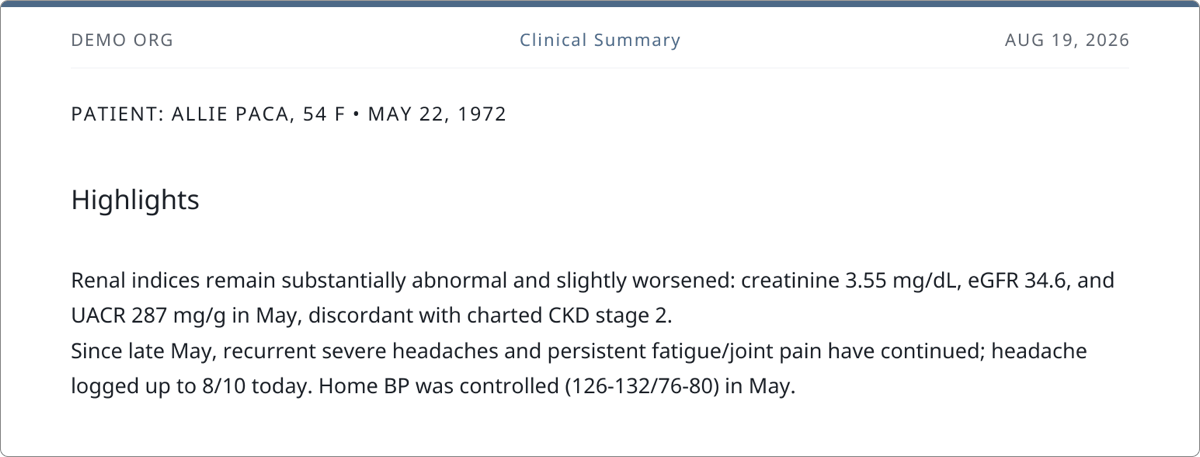
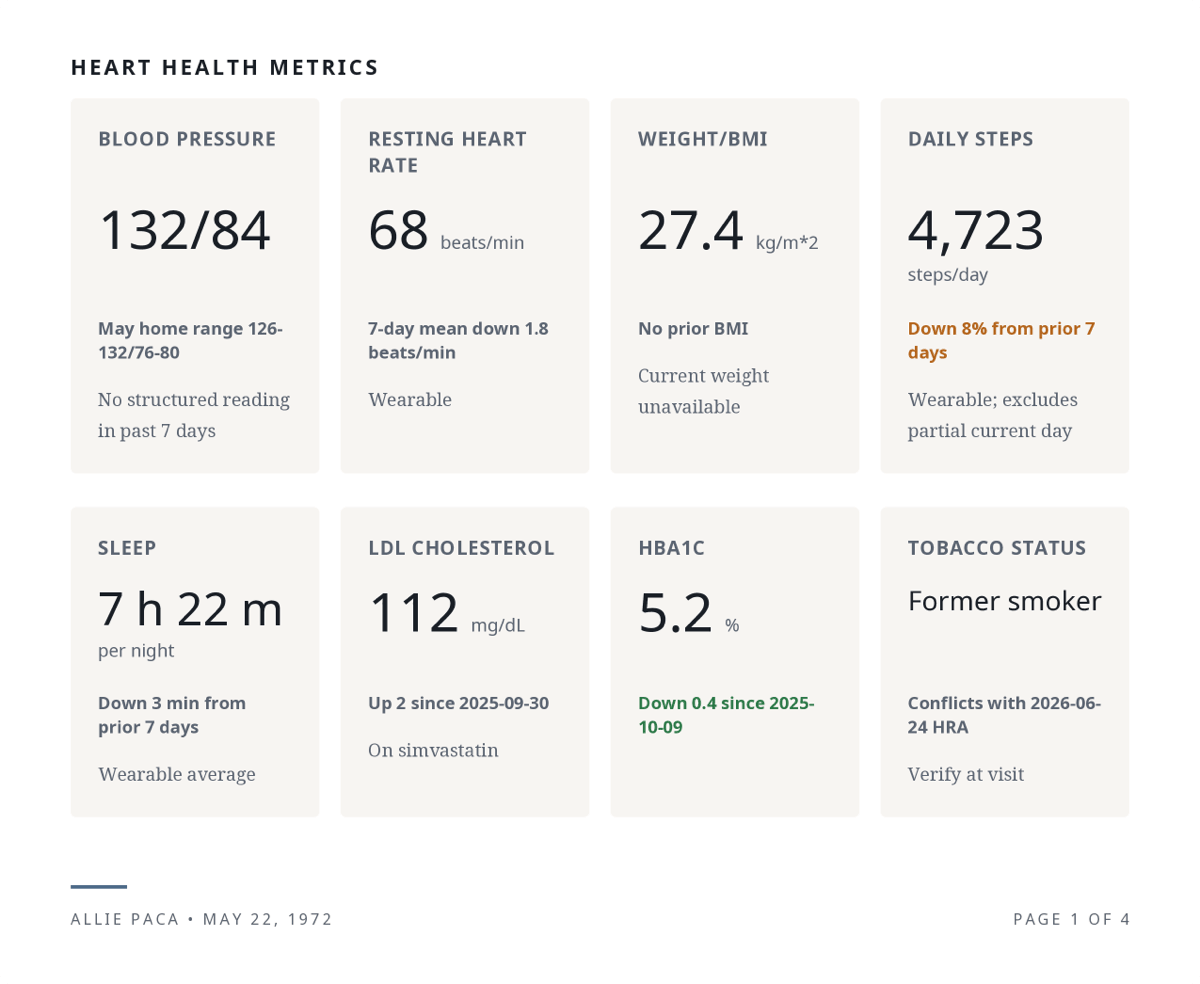
Patient Info and Highlights
Two or three findings that need attention first, stated with the values attached, including any trends or patterns that should be called out.
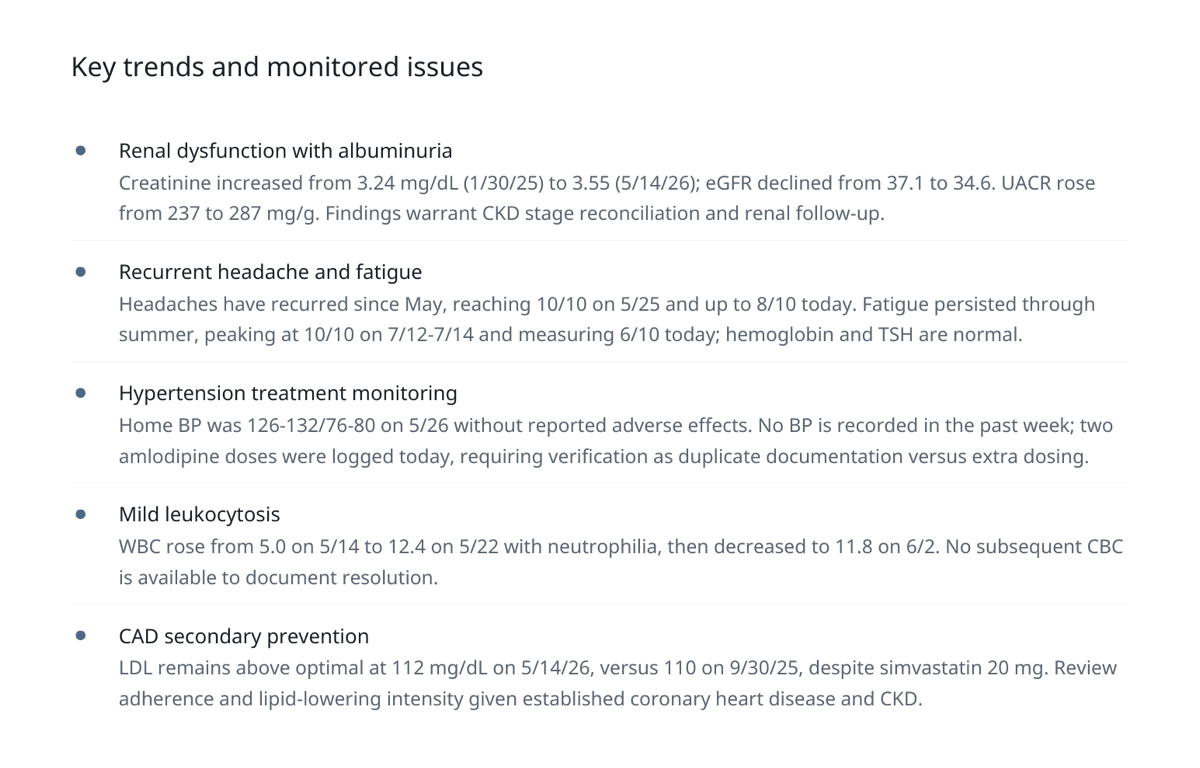
Key Trends and Monitored Issues
One short entry per active problem, showing where a value was, where it is now, and over what period. Current medications along with any changes can belong here too. This section can also include gaps in care, like a missing follow-up lab, an unrecorded blood pressure, or a due screening.
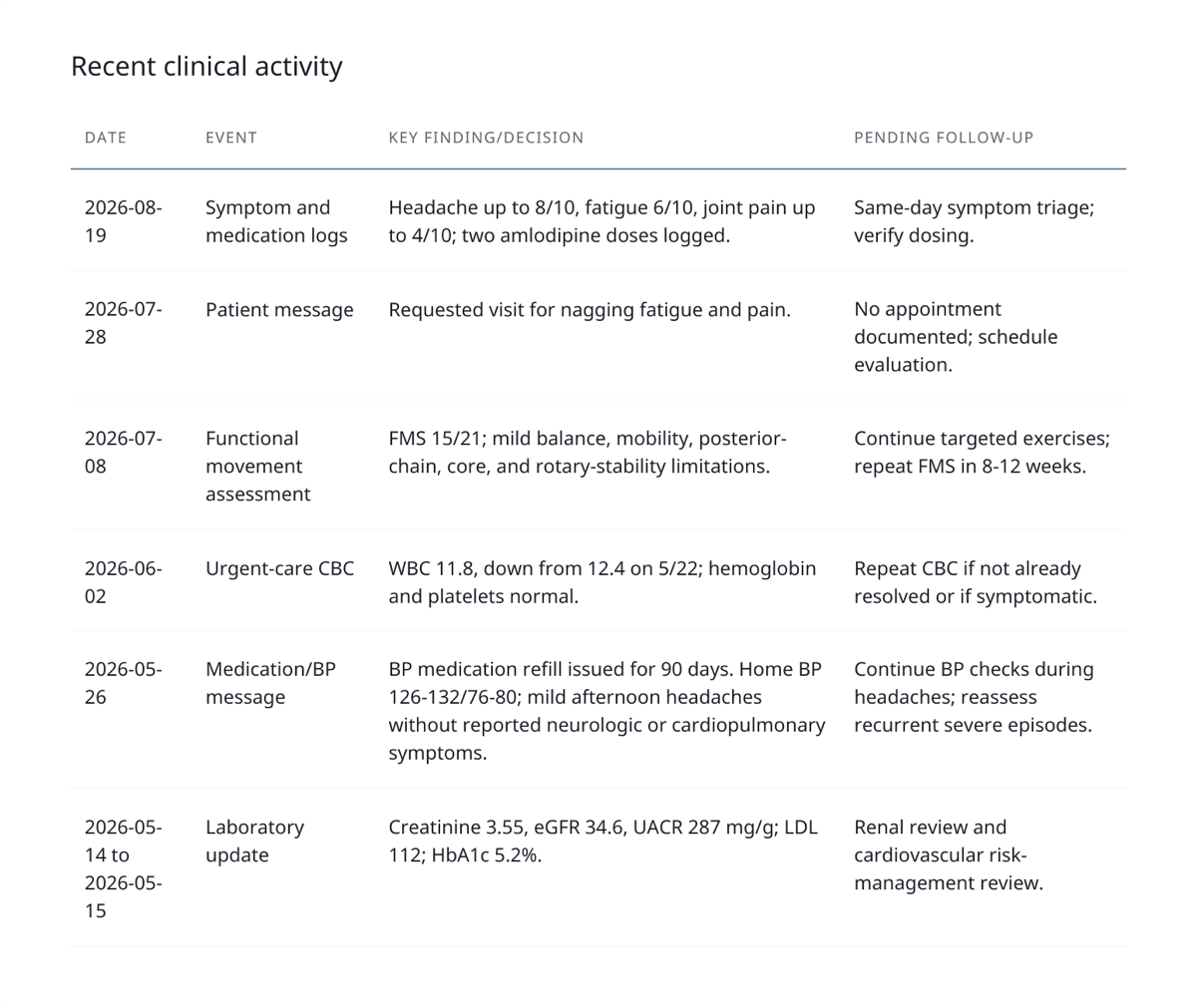
Recent Clinical Activity
A chronological view of what has happened across every connected source: outside visits, patient messages, symptom logs, medication adherence entries, and new results, each with any follow-up still pending.
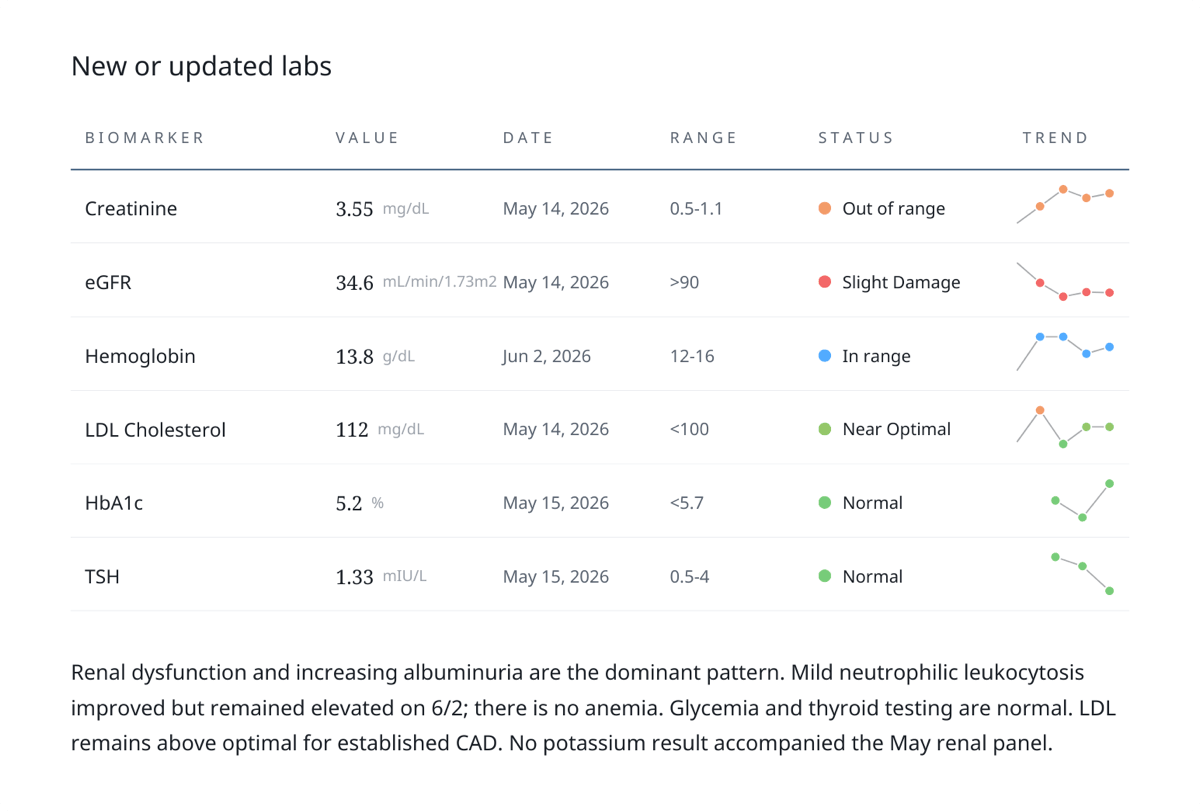
New or Updated Labs
Values with reference ranges and trend direction, plus a short synthesis of the overall pattern. Rather than a flat list of numbers, the summary shows which labs are new, which moved, and which crossed a threshold worth discussing.
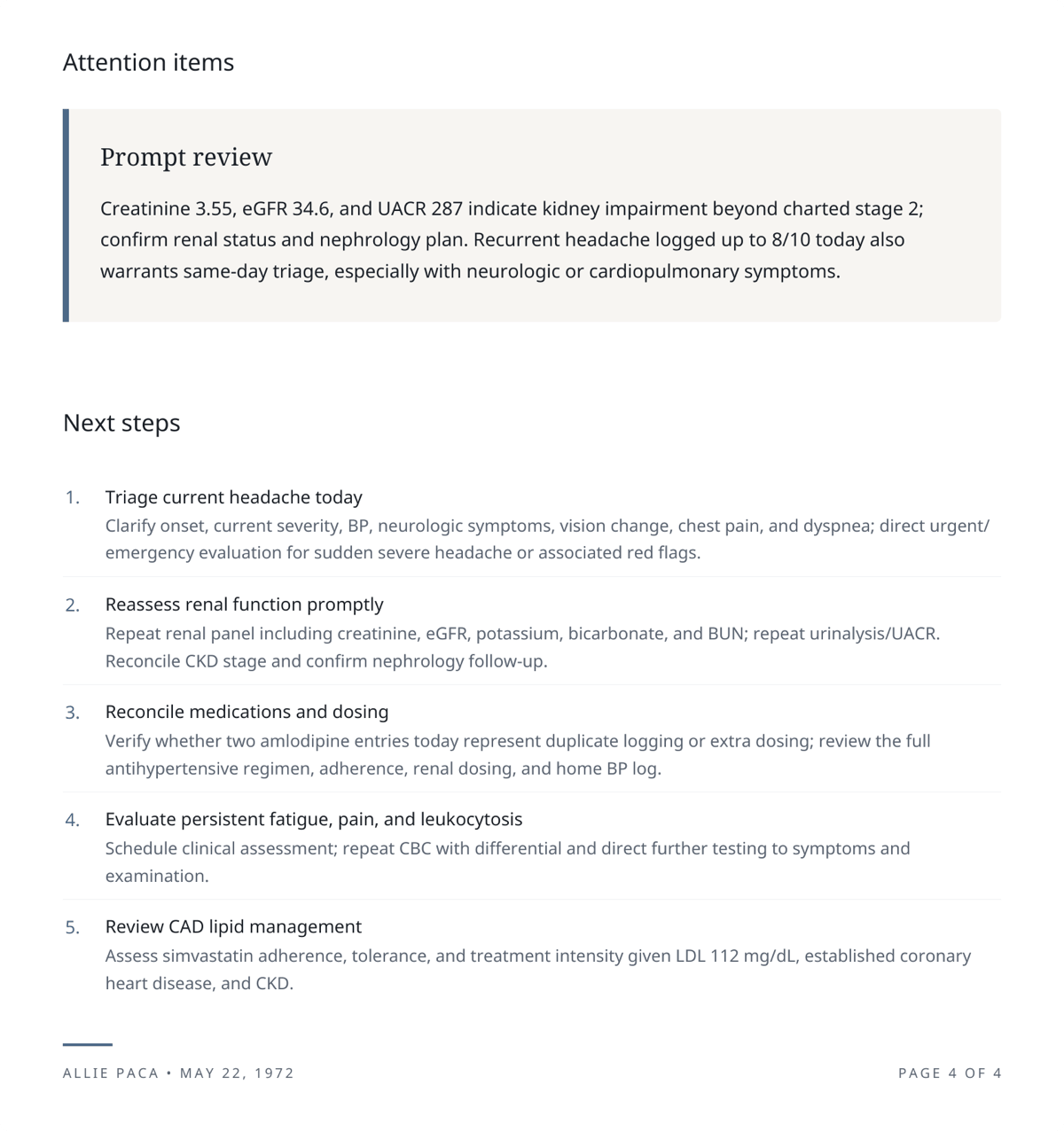
Attention Items and Next Steps
What needs a decision before or during the visit, followed by specific actions. This turns the summary into a working plan for the conversation, not just a record review.
The structure above works well for complex, longitudinal cases. A longevity practice, a cardiology-focused panel, and an annual wellness visit will each call for different sections, different priorities, and different levels of detail. Summaries in Guava are flexible and can be customized by visit type, and because templates are reusable, a practice needs to configure each format only once.
How AI Clinical Summaries Work in Guava
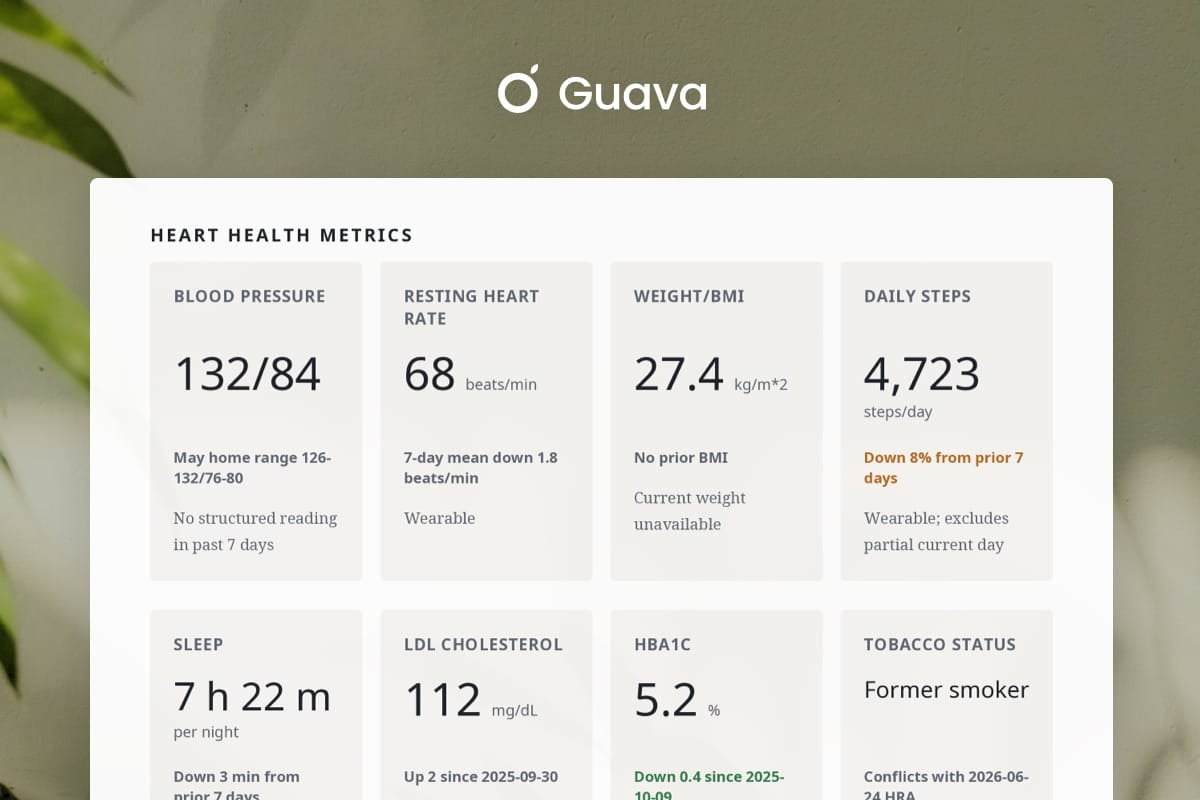
Guava's AI medical summaries are fully customizable, from structure and template prompts to finalized text. Pre-built templates make it easy for practices to hit the ground running, while individual sections can be added, removed, or rewritten to suit any appointment type, specialty, or patient need. Practices can also incorporate custom health scores and visuals for key metrics, giving providers a clearer picture of patient trends.
Creating summaries in Guava follows a simple workflow: template, generate, review.
Where the Data in an AI Clinical Summary Comes From
An AI clinical summary is only as good as its inputs. Guava draws from multiple connected sources:
- EHR integrations: Labs, visit notes, and medical history from Hint, Elation, Cerbo, athenaOne, and more.
- Uploaded records: Patients and providers can upload physical documents. Guava uses AI-enabled OCR to parse and organize the content, including labs, conditions, medication lists, and visit notes.
- Patient portals: Patients can connect their external portals to Guava so that you can see past medical history from outside labs, specialists, and other health systems.
- Wearables and patient-logged data: Patients connect wearables and log their own data in the Guava app, making sleep, activity, symptoms, and medication adherence visible in the summary.
- Messaging: Relevant context from message exchanges in Guava or Spruce can appear in summaries when applicable.
- Additional context: Before generating, a provider can add notes or context not already captured in the patient's Guava profile.
Bringing these sources together in one place is what turns scattered documentation into a single, reviewable brief.
Pre-Visit Planning as a Repeatable Workflow
AI clinical summaries are most useful when they become routine rather than occasional. Because templates are reusable, a practice can configure different formats for different appointment types: a chronic disease review, an annual physical, a new patient intake, and a specialty consult can each have their own structure. Once set up, each template applies consistently every time it's used.
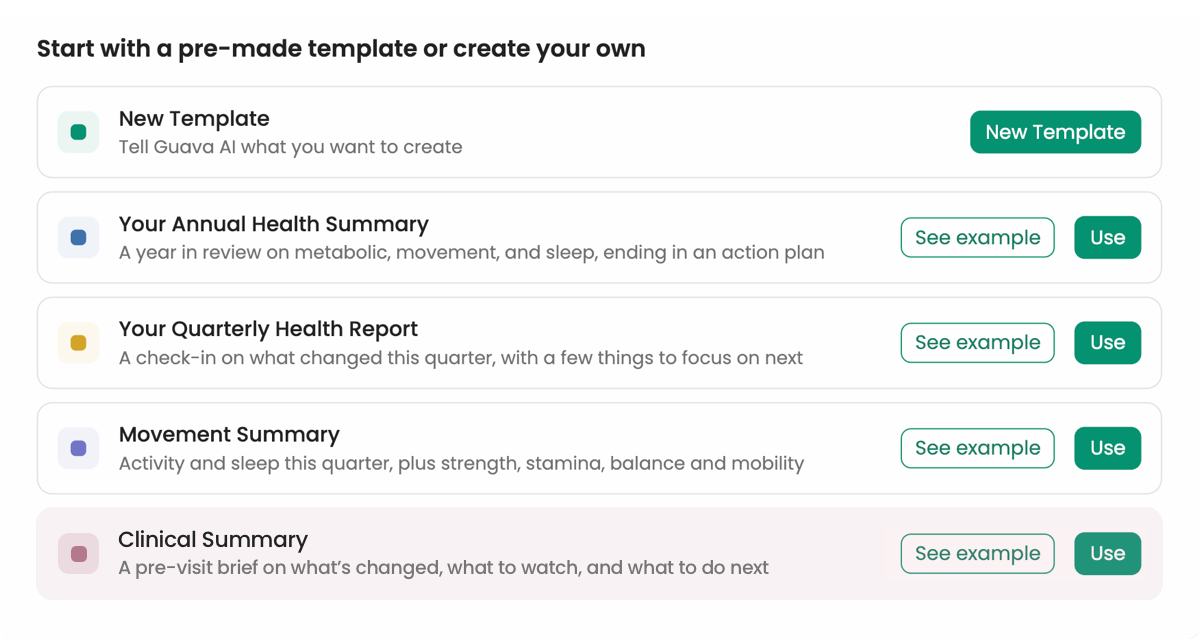
Reviewing information in a consistent format makes it easier to notice when something is missing or abnormal. Practices can also generate summaries for an entire day's schedule at once, turning individual pre-visit prep into a single step that happens before clinic hours start.
Why Provider Review Is Built Into the Process
AI-generated summaries provide a strong starting point, ready for your expert review and final approval. Guava checks generated summaries and flags items that need a second look: conflicting sources, sensitive information, or data that appears inconsistent across records. These flags are meant to direct attention, not to make determinations, and nothing generated or flagged is written back to the patient's EHR.
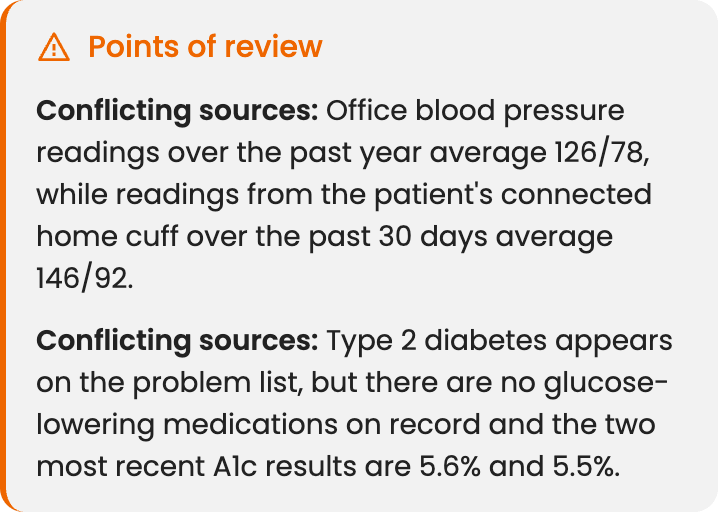
Review is where clinical judgment gets applied to a document assembled from data. The provider confirms what's accurate, applies edits, and adds any missing context.
Patient-Facing Medical Summaries
The same system that generates clinician-facing summaries can also produce patient-facing progress reports. These summaries are built from the same records, labs, and wearable data, but written with the patient in mind rather than the clinician. A quarterly update might summarize sleep trends, exercise consistency, and progress toward a stated goal like improving blood pressure, all pulled from the same connected sources.
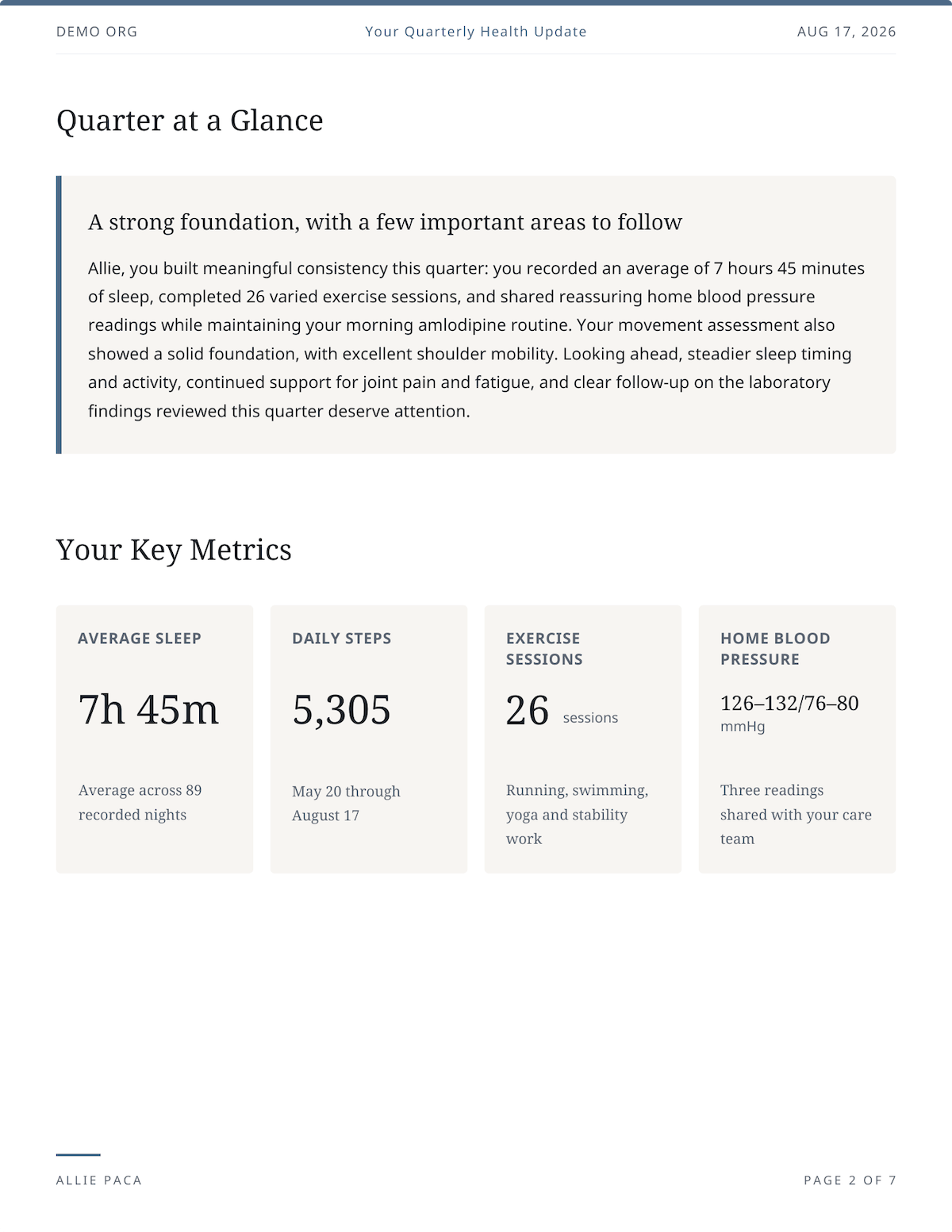
Presenting this information to patients in a clear, accessible format gives them a tangible sense of progress, reinforcing the value of their membership and making their healthcare journey feel more engaging and rewarding. Using one system for both sides of the visit keeps the underlying data consistent, even as the tone and level of detail shift to meet each audience where they are.
Getting Started
Setting up an AI clinical summary workflow starts with a template: either adapting a pre-built option or describing the structure and style in plain language. From there, a practice can generate a summary for one patient to see how it looks before rolling it out across a full panel. Because review is built into the process, there's no risk in testing it on a handful of upcoming appointments before deciding how much of a practice's pre-visit workflow to shift over.
Frequently Asked Questions
What is an AI clinical summary?
An AI clinical summary is a structured brief generated from a patient's records, labs, and wearable data to prepare a provider before a visit. It organizes what has changed, what needs a decision, and what questions are worth raising, based on the patient's connected health information.
How is an AI clinical summary different from an AI medical chronology?
An AI medical chronology is a time-ordered account of a patient's clinical history, often used in legal or IME contexts. An AI clinical summary used for pre-visit chart review serves the same chronological organizing function but is built for clinical decision-making: it surfaces what changed, flags what needs attention, and prepares the provider for the visit, rather than producing a formal record for external review.
How can I tell where a detail in an AI medical record summary came from?
Each section of a Guava summary is built from a specific data source: records, lab results, wearable data, symptom logs, messages, or extra details you provided in the summary prompt. When a detail needs a closer look, such as a lab value that moved or a medication change, you can check it against that source in the patient's chart before you approve the summary.
Can an AI summary pull data from outside providers and other health systems?
Yes. Guava can incorporate records from patient-connected portals, direct EHR integrations, and even unsearchable, scanned PDFs, along with labs and wearable data, for a more complete picture than a single system alone.
Are flagged conflicts in a summary written back to the EHR?
No. Flags are meant to direct the provider's attention during review. Nothing generated or flagged in the summary is automatically written back to the patient's electronic health record.
Can the same tool generate reports for patients, not just providers?
Yes. The same underlying system that builds provider-facing pre-visit briefs can also generate patient-facing progress reports using the same connected records, labs, and wearable data, but written in a patient-friendly tone.