
Article summary: Guava is an AI-powered functional medicine platform built for practitioners delivering root-cause care. It brings together lab tracking, a patient portal, personalized health scores, and AI automation in one place — giving both providers and patients a clearer, more complete view of health data over time. Guava integrates with EHRs designed for functional and membership-based practices, including Cerbo, Hint, Elation, Akute, and athenahealth, so it fits into the workflows your practice already relies on. If you're looking for functional medicine software that supports bio-individualized interpretation without adding manual overhead, Guava is built to meet that need.
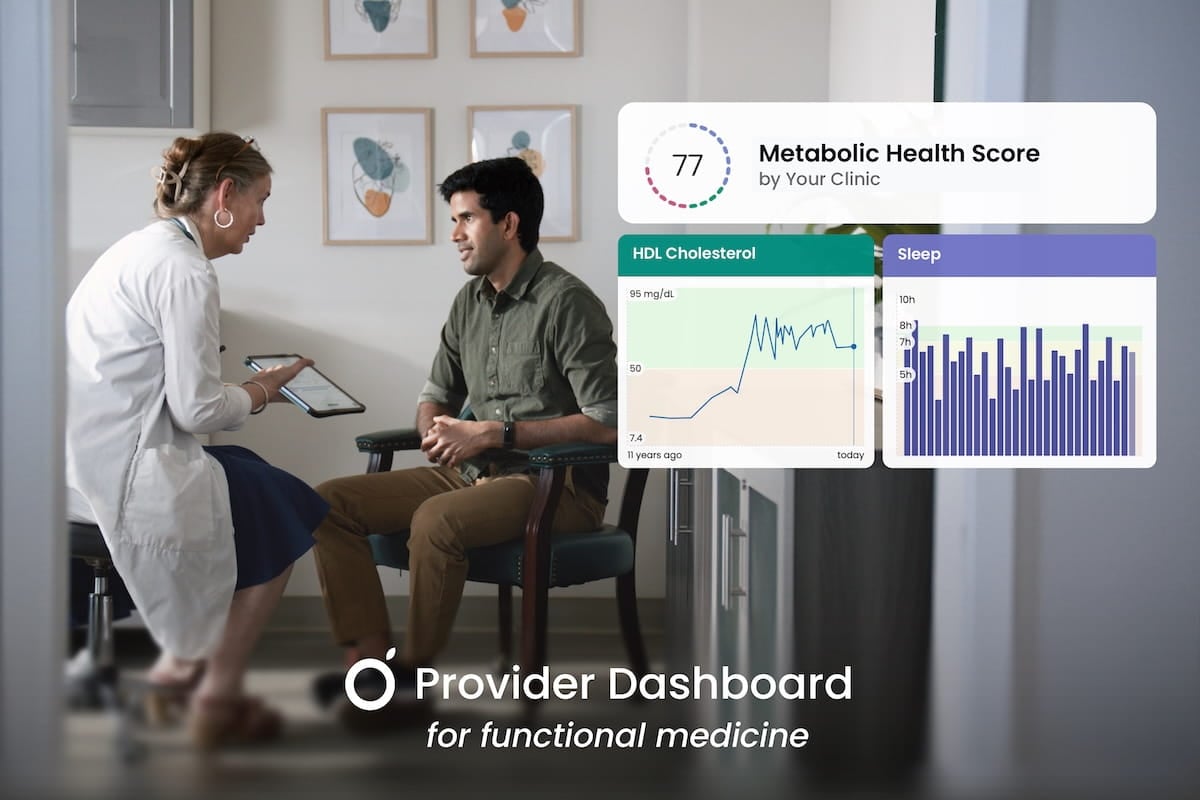
In this article, we’ll discuss how you can utilize Guava in your practice to deliver a customized, AI-enabled functional health experience for your patients, from personalized lab ranges to patient-specific health scores.
Functional medicine, being grounded in both context and pattern recognition, often necessitates a more personalized approach to patient care than conventional care models. A lab value within a standard "normal" range may still signal dysfunction when viewed against a patient's unique symptom patterns, genetics, history, and environment. For clinicians, the ongoing challenge has been finding functional medicine software that supports this level of nuance and systems-based thinking without adding burden to everyday workflows.
Guava is built to meet that need. Its patient health dashboard is actionable from day one, with AI-powered clinical tools and smart defaults that support holistic, longitudinal insights and root-cause analyses out of the box. For clinicians who want more granular control and bio-individualized interpretation, deeper customization is available too, making it a functional care platform that can genuinely mirror your clinical framework.
For a detailed look at how Guava unifies data from multiple lab sources, you can read more about its lab integration and normalization capabilities.
Custom Lab Features That Reflect Your Clinical Framework
Guava's Provider Dashboard gives you the tools to contextualize lab results in a way that aligns with your practice style. As a functional medicine practitioner, you know that "normal" can be very different from "optimal." Standard lab reference ranges, derived from the general population, often miss the nuances needed to assess early imbalances or guide personalized care.
The platform appears as an extension of your clinic rather than a third-party tool, which matters for practices where brand continuity and patient trust go hand in hand. You can customize reference ranges, add your own biomarker descriptions, and build panels that reflect how you think about disease. This helps you educate patients and guide treatment more effectively and in a way that aligns with your treatment style.
Patient-Specific Lab Ranges
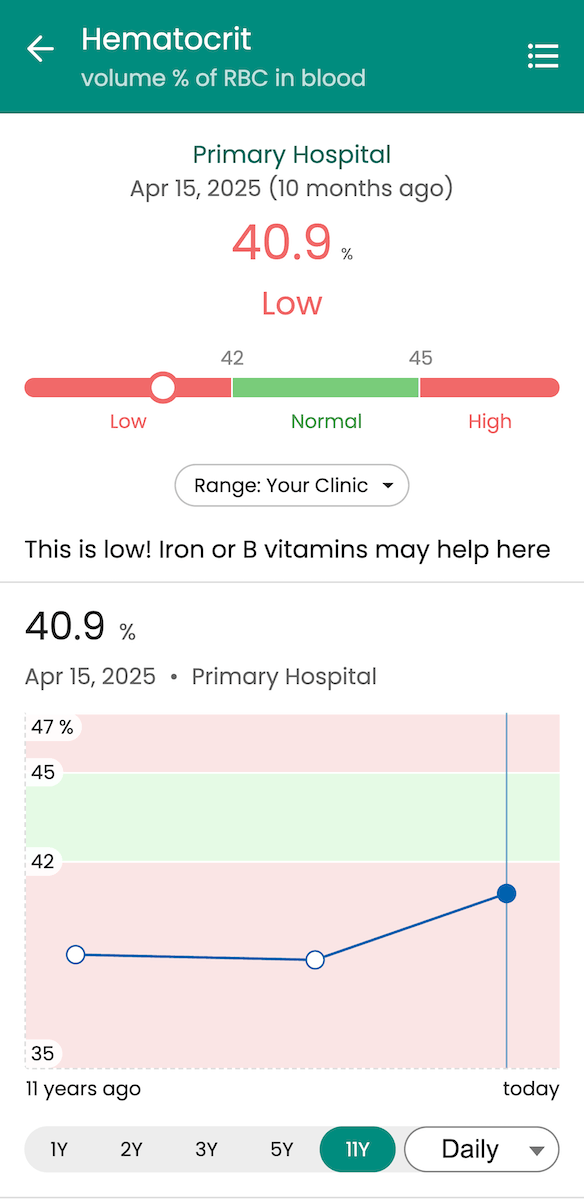
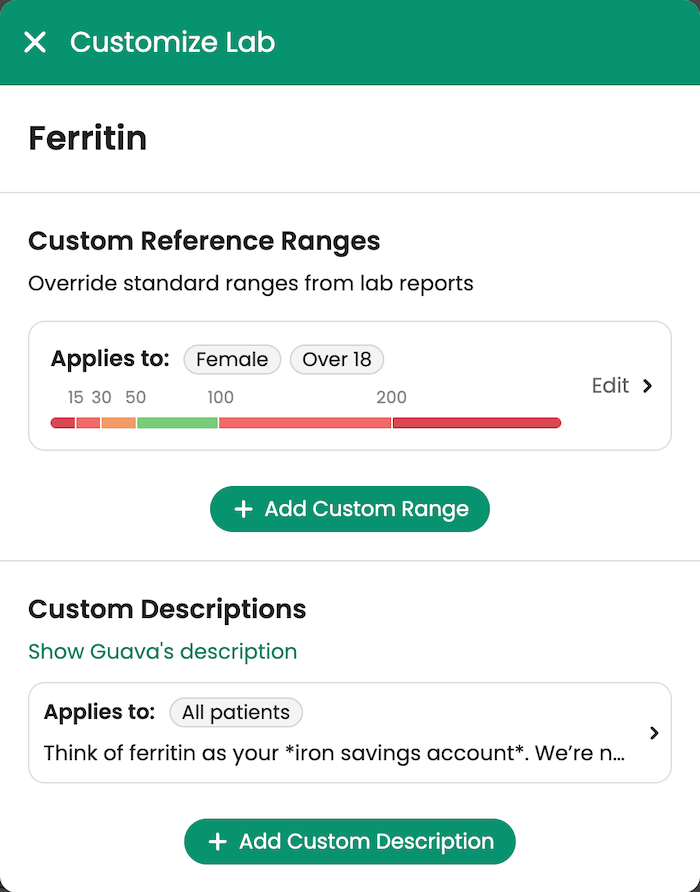
The Provider Dashboard allows providers to set custom lab reference ranges based on patient-specific demographics, biology, and clinical history, which is a critical feature for any functional lab analysis software. Guava also includes built-in smart defaults, eliminating the need for manual setup when they don’t serve your use case. This ensures that results are contextualized meaningfully from day one.
Without any customization, Guava automatically categorizes patients by age and sex and applies appropriate reference ranges. When lab-provided ranges are unavailable or not yet customized, Guava falls back on clinically grounded defaults for common labs, informed by sources such as the World Health Organization, the American Board of Internal Medicine, the National Institutes of Health, and other trusted organizations.
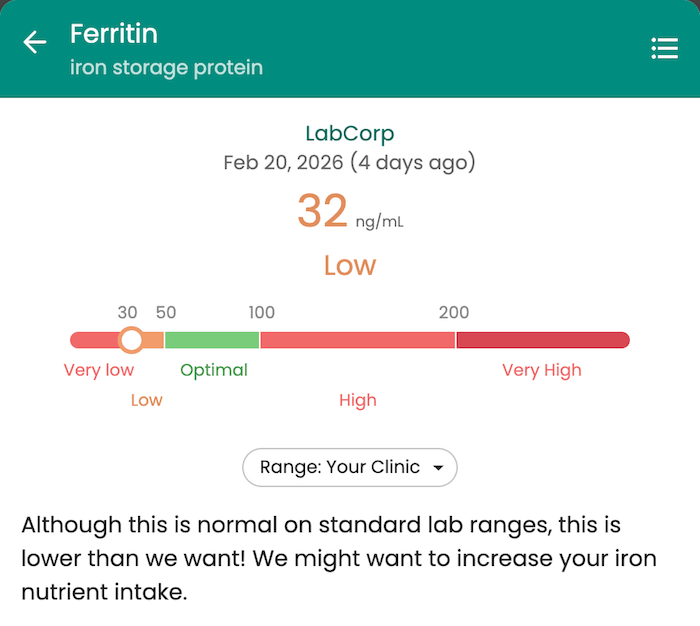
From there, customization is straightforward. For instance, if a patient's overall condition improves when their Ferritin is above 50 ng/mL despite a standard lab floor of 15 ng/mL, you can adjust their range in Guava accordingly. You can also define age- and sex-based ranges to automatically apply specific targets across demographic groups, ensuring consistent analysis without manual entry. When patients access the Guava app as their functional medicine portal, they see their results within the context you've established, reinforcing your specific treatment goals.
Custom Lab Descriptions and Interpretations
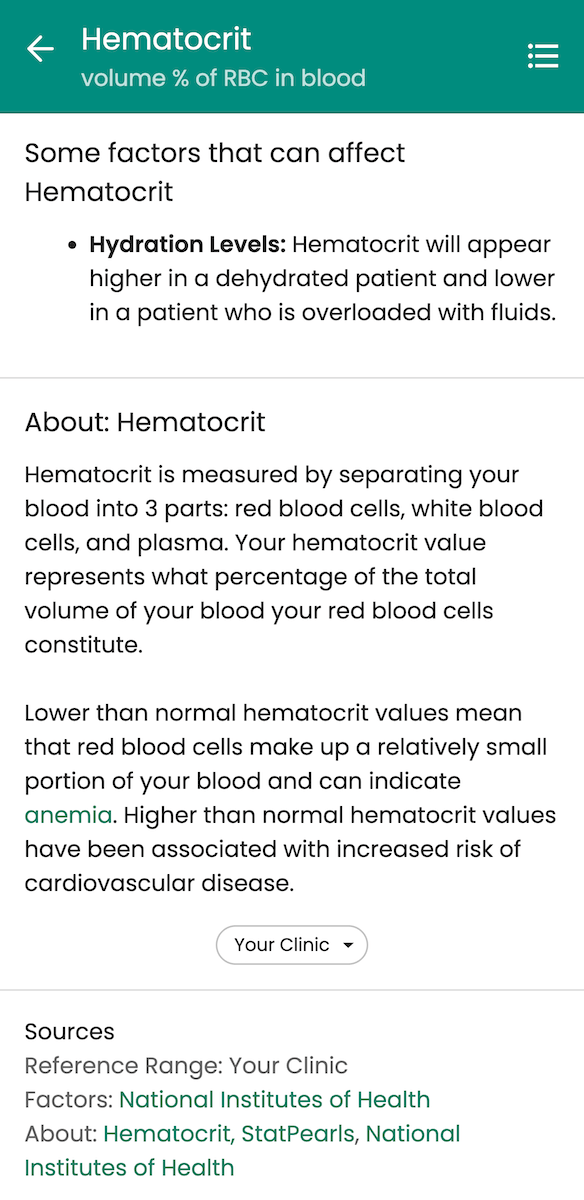
Guava provides default descriptions for many commonly tested biomarkers, so patients already have context without requiring additional setup. At the same time, you can customize lab education and interpretation to reflect how you practice.
You can create custom biomarker descriptions to include analogies you use in practice. You can also add interpretations based on where patients fall within a reference range, making the information immediately relevant to them. You can even link out to additional resources or pages to provide deeper education between visits. This transforms the health dashboard into a learning tool that explains why you’re tracking specific markers, fostering better patient engagement and adherence to protocols.
Biomarker Panels Tailored to Your Clinic
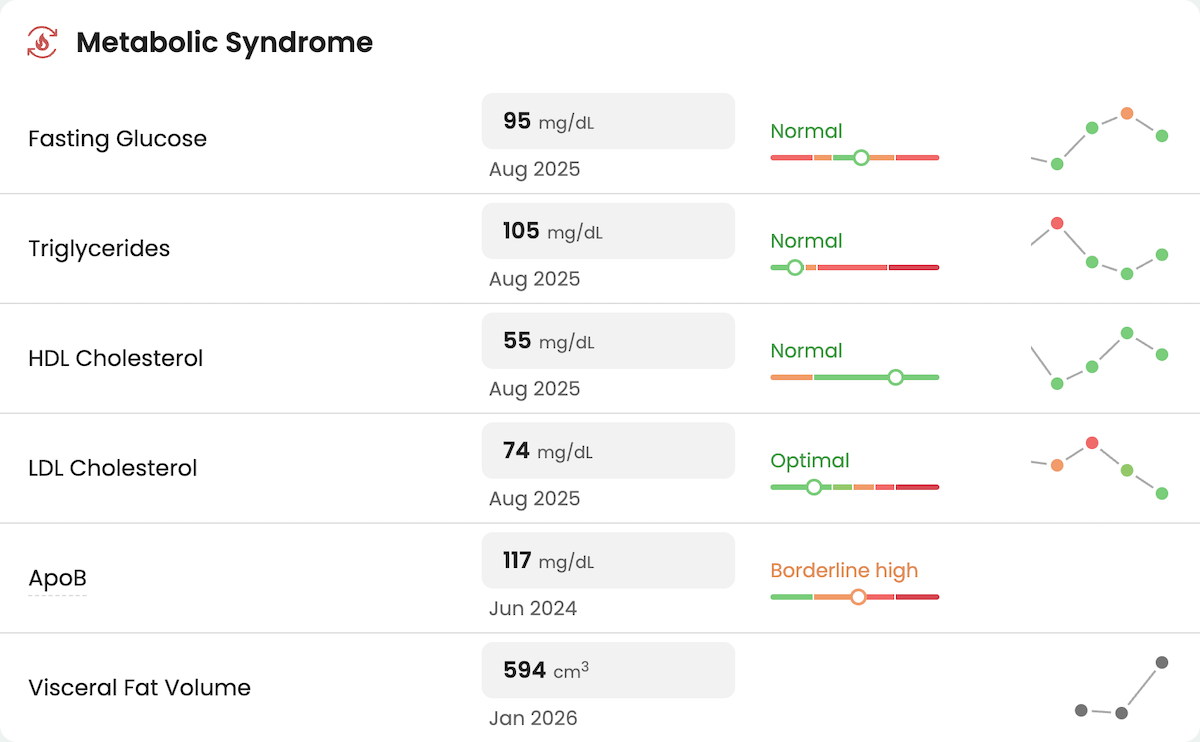
In the Provider Dashboard, you can build custom biomarker panels that reflect how you think about disease, not just how a lab bundles tests.
For example, if your practice often sees patients with metabolic syndrome, you may create a single panel composed of all their relevant biomarkers over their lifetimes. This alleviates the need to mentally piece together scattered labs across various CMPs, lipid panels, and DEXA scans by visually unifying their relevant medical data.
A High-Touch Patient Experience Without Manual Overhead
Guava provides tools that create a high-touch, engaging patient experience while streamlining your own workflow. It’s meant to alleviate the significant manual effort required for delivering more personalized care.
You and your patients get a comprehensive, organized view of all relevant health data in one place, across wearables, nutrition, symptoms, labs, and medical records from other facilities. Features like health scores and an AI interface equipped with your patient's full medical history distill that information into a digestible format for both of you.
Custom Health Scores for Patient Motivation and Adherence
Guava allows you to build custom health scores: composite metrics that pull from multiple data sources and distill them into a single, understandable number. You can combine inputs such as specific lab values, appointment history, symptom logs, and device data like sleep duration or step count, to create a score that reflects progress in a specific area.
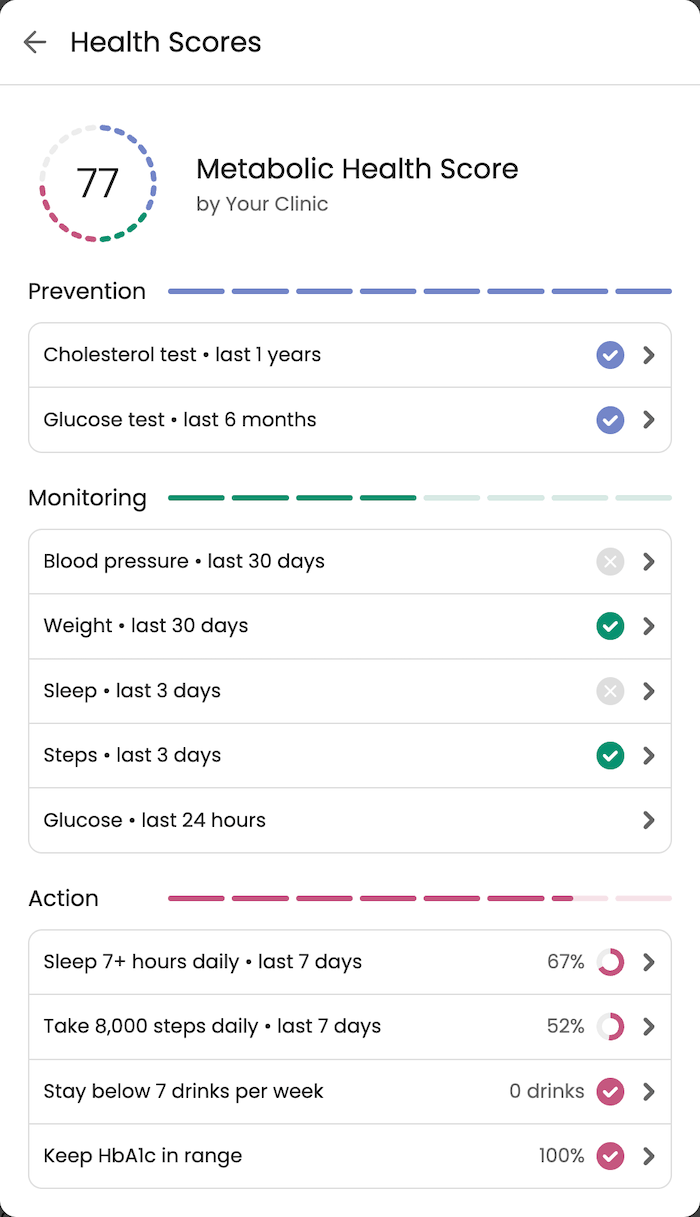
For example, a "Metabolic Health Score" might weigh:
- Fasting Glucose
- Cholesterol
- hs-CRP
- HbA1c
- Weight
- Daily step count
- Overdue visits to your clinic
This bridges the gap between daily actions and long-term outcomes. Instead of parsing a spreadsheet of raw numbers, patients see a clear picture of where they stand. Using health scores, incremental progress that might otherwise go unnoticed becomes a motivator.
Turning Data Into Insight With AI
Guava's AI tools are built on top of your patients' full health picture, including medical history, labs, symptoms, and wearable data. This context makes the constant stream of patient data organized, searchable, and actionable for both you and your patients.
For providers, AI can:
- Generate summaries of patient data across specific timeframes
- Answer structured questions about trends (e.g., “How has insulin resistance changed since starting metformin?”)
- Surface correlations between symptoms, labs, and behaviors
- Draft concise visit summaries based on longitudinal records
This reduces chart review time while preserving clinical control.
For patients, AI supports informed engagement by allowing them to:
- Ask questions about their own data (“How is my back pain compared to last month?”)
- Locate prior records (“When was my last Pap smear?”)
- Generate structured visit preparation summaries
- Understand patterns in symptoms or labs over time
Rather than replacing clinical reasoning, these tools help both parties navigate complex longitudinal data more effectively.
Integrating Wearable Data, Patient Logs, and Body Composition Into Functional Care
The AI tools described above are only as powerful as the data behind them. Guava brings together continuous wearable data, patient logging, and advanced biometrics that are often central to functional and longevity-focused care. This includes metrics from wearables like Oura, Dexcom, Apple Health, and Fitbit, alongside imaging-derived measurements such as bone mineral density, visceral fat, lean mass, and other body composition data from DEXA scans. These markers can help provide insight into structural and metabolic changes that standard lab panels may not capture.
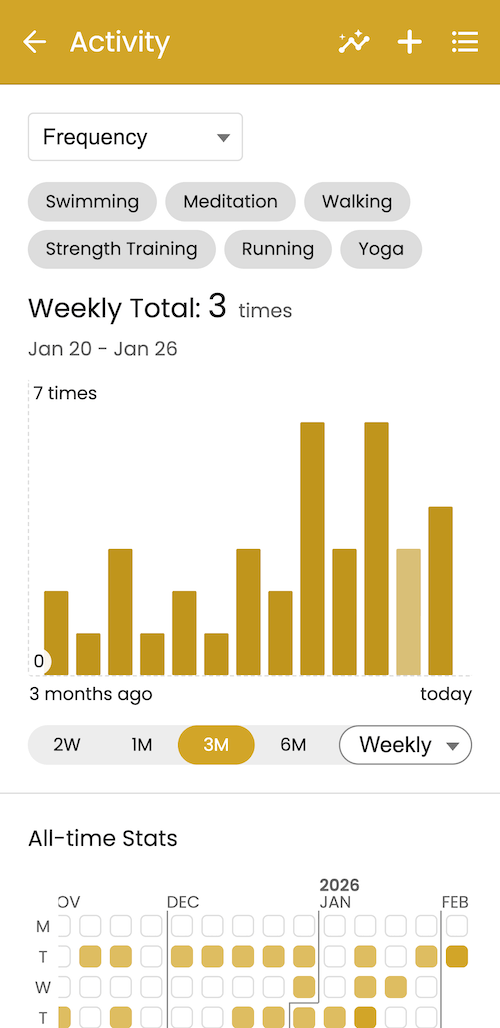
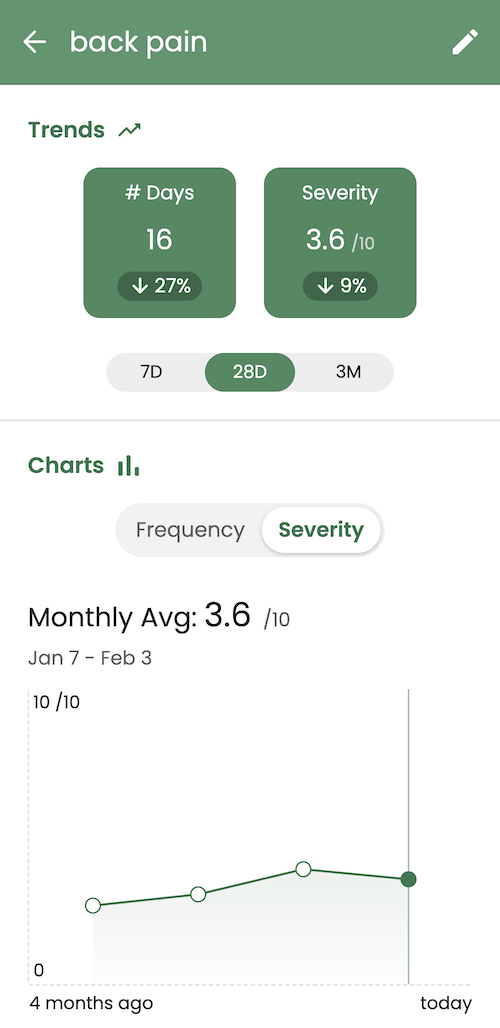
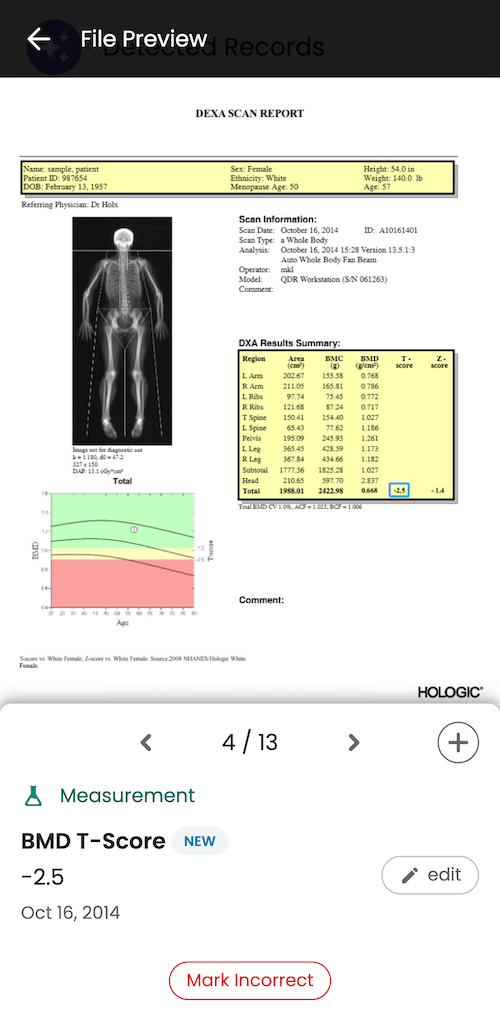
Because this data is tracked longitudinally and presented alongside symptoms, labs, and protocols, you can monitor how daily behaviors, interventions, and therapies influence meaningful outcomes over time. Customizable AI alerts can notify you when wearable trends shift or when key metrics move outside of your defined targets, helping you intervene earlier without constant manual review.
Integrated messaging further enables timely, contextual communication with patients based on their real-world data. Together, this creates a more responsive, personalized care experience, allowing you to stay closely connected to your patients’ progress while maintaining a scalable workflow.
Where Guava Fits in a Modern Functional Tech Stack
No single tool can do everything. A modern functional medicine practice often relies on a multi-layer technology stack to manage different aspects of patient care and operations. Guava is designed to be the interpretation and engagement layer within this ecosystem.
A typical stack might include:
- Your EHR/Practice Platform: This system handles core clinical workflows like documentation, prescribing, and billing.
- Guava: This is your hub for data consolidation, messaging, personalized monitoring, advanced interpretation, and AI tools. Guava is also the tool you give patients to increase engagement with your practice. It’s where they can view labs and medical data, communicate with you, and track health between visits.
- Specialty Tools and Services: You may use other platforms for genetic sequencing, microbiome testing, DEXA scans, or other specialized data.
This framework allows you to leverage Guava’s strengths in creating a patient-centric experience while integrating with the other systems that run your practice.
Learn more about Guava’s direct integrations with Cerbo, Elation, and InBody.
Delivering Root-Cause Care at Scale
By leveraging Guava’s customization features, you can deliver a level of care that is both sophisticated and accessible. From personalized reference intervals to customizable health scoring and alerts, this approach transforms the patient experience from a passive receipt of test results into an active, engaging partnership. It simplifies the complex data of functional medicine, making it easier for patients to understand their bodies and for providers to demonstrate the value of their care.
HIPAA Compliance
Guava takes the privacy and security of health data very seriously and is fully HIPAA-compliant. All data stored in Guava is encrypted and secured using industry standards. Data is also safeguarded from unauthorized access and tampering, and uses modern cloud technologies built specifically for HIPAA compliance.
Read more about privacy and security at Guava.
Next Steps
If you are looking to streamline your practice and offer a superior patient experience, explore how Guava’s provider tools can fit into your workflow. Start by identifying the top five biomarkers you track most frequently, and consider how custom ranges, educational descriptions, or their integration into a health score could improve patient understanding and engagement.
Frequently Asked Questions: Guava, Functional Health Personalization, and AI Automation
What is functional health personalization, and how does Guava support it?
Functional health personalization is the practice of tailoring lab interpretation, health monitoring, and clinical insights to each patient's unique biology, history, and goals — rather than applying one-size-fits-all population averages.
Guava supports this approach by giving practitioners the tools to consolidate health data across EHRs, set patient-specific lab ranges, build custom biomarker panels, and generate AI-driven insights grounded in each individual's full health record. Rather than treating each data point in isolation, Guava connects inputs from over 100,000 health systems and fitness devices to surface patterns specific to each person. The result is a care experience where data is always viewed in context, helping both providers and patients make more informed, meaningful decisions.
This approach reflects the core premise of functional medicine: that health is shaped by the interaction of multiple systems over time. Guava lets users track variables like sleep, blood pressure, glucose, cycle data, and medications alongside lab results, making it easier to identify what's driving symptoms rather than simply cataloging them.
What is lab tracking software for functional medicine, and does Guava offer it?
Lab tracking software for functional medicine is a platform that collects, organizes, and contextualizes biomarker data from multiple sources, helping practitioners move beyond standard reference ranges to interpret results within each patient's full clinical picture.
Guava is built specifically for this purpose, supporting thousands of biomarkers, custom reference ranges, and longitudinal trend tracking across labs from any source. Practitioners can integrate directly with EHRs like Cerbo, Hint, Elation, athenahealth, and more, while both patients and practitioners can upload photos or PDFs of lab reports. Patients can sync results directly from providers like Labcorp and external patient portals, and view trends across thousands of report formats in multiple languages.
For functional medicine workflows, this means biomarker data is no longer siloed by provider or visit. Guava consolidates results from any source into a unified timeline, enabling both patients and clinicians to track how key markers shift in response to interventions, dietary changes, or treatment protocols over time.
Does Guava offer AI automation for functional medicine practices?
Guava uses automated data extraction and AI-powered parsing to process lab results from uploaded PDFs, photos, and synced patient portals. This reduces the manual effort typically required to organize and interpret fragmented health records. This automation is particularly relevant for functional medicine, where comprehensive biomarker tracking across multiple sources is standard practice.
The platform's AI assistant also automatically analyzes recorded data to surface changes between visits, for example, highlighting patient-recorded symptom flares, a decline in medication adherence, or a gradual increase in blood pressure from an at-home device. While Guava is not a diagnostic tool, its automated pattern recognition and ability to query patient medical history helps practitioners and patients move from raw data to actionable observations more efficiently.
How does Guava's patient portal integration work for functional health providers?
Guava offers direct integrations through the Provider Dashboard so that functional health providers can integrate data from systems they're already using, like Cerbo, athenahealth, Elation, and more.
On top of that, Guava connects to over 100,000 health providers and patient portals — including Epic, Cerner, MyChart, Athenahealth, and NextGen — through patient-mediated connections. This allows patients to sync their records directly into the Guava platform. For functional health providers, this means patients arrive with organized, accessible data rather than fragmented paper records or disconnected portal logins.
Through Guava's Provider Dashboard, clinicians can access a unified view of patient-submitted data, including lab trends, symptom logs, and device metrics from wearables like Oura Ring, WHOOP, Dexcom, and Garmin. This reduces intake friction and creates a more complete clinical picture ahead of each consultation.
Why should functional medicine practitioners consider Guava as part of their tech stack?
Guava addresses one of the most persistent challenges in functional medicine: fragmented, incomplete patient data. By consolidating lab results, symptom logs, wearable metrics, imaging, and medication history into a single HIPAA-compliant platform, Guava gives practitioners the longitudinal data density that functional health assessments require — without adding administrative burden to patients or staff.
Three specific capabilities make Guava relevant for functional medicine tech stacks:
- Centralized lab tracking: Results from any provider or format are parsed, organized, and trended automatically
- Patient-generated health data: Symptoms, lifestyle factors, and device metrics are logged daily and available for clinical review
- Visit preparation tools: Patients can generate printable health summaries before appointments, reducing time spent reconstructing history and increasing the quality of clinical conversations